








Published: March 23, 2026
Updated: March 23, 2026


Quick Summary
The right contract management software can help you speed up your sales cycle. In this guide, we reviewed 10 of the best tools on the market, including Proposify, PandaDoc, and Sirion. We looked at features, pricing, and G2 ratings. You’ll see how they compare and why Proposify is the top pick for sales teams who want to close deals faster.
Contract Management Slowing You Down?
You send the contract, and then you wait. Maybe the client has a question, or your legal team updates a clause. Suddenly, you have three versions of the same document floating in your email. It’s messy.
There are plenty of software options to help out, but they aren’t all the same. Some just handle e-signatures, while others manage the whole process. So how do you pick the right one?
We’ve done the hard work for you and compared 10 top tools side by side. We break down how they handle contract lifecycle management to help you make the right decision based on actual research. We’ll also show why Proposify is a smart choice for sales teams.
Why Listen to Us
At Proposify, we’ve spent years obsessing over the final stage of the deal. We know the difference between software that just stores paperwork and tools that help sales reps get the signature. This guide is built on research and the lessons we’ve learned from thousands of teams who use our platform to close business deals every day
What Makes the Best Contract Management Software?
The best software isn't about having the most features. It’s about having the right tool that will help you finalize agreements without the headache.
Here is what matters most:
- Ease of Use: If it takes a week to learn, your reps won't use it. You need a tool that is intuitive and simple to navigate.
- CRM Integration: Your contract tool must talk to your CRM. You shouldn't have to copy-paste names and deal values manually. It wastes time and causes errors.
- Control and Permissions: You need to lock down legal terms. Sales reps should be able to change the price or the name, but not the liability clause.
- Visibility: You shouldn't have to guess if a client has opened the document. Good software tells you when they look, what they read, and when they sign.
- Scalable Pricing: You shouldn't be punished for growing. Look for clear, per-user pricing that makes sense whether you have 5 reps or 50.
Top 10 Contract Management Platforms to Pick From
Here is a quick snapshot of the tools we reviewed. We compared them by G2 rating, key features, ideal use cases, and pricing so you can see at a glance which ones fit your team best.
|
# |
Tool |
Pricing |
Key Features |
Best For |
G2 Rating |
|
1 |
Proposify |
Starts at $19/user/mo |
Interactive templates, granular permissions, engagement analytics |
Sales teams needing brand control & insights |
4.6 / 5 |
|
2 |
PandaDoc |
Starts at $19/user/mo (Free plan available) |
Drag-and-drop editor, payment collection |
General document workflow automation |
4.7 / 5 |
|
3 |
Sirion |
Custom pricing |
AI obligation tracking, deep ERP integration |
Enterprises needing deep AI & visibility |
4.5 / 5 |
|
4 |
LinkSquares |
Custom pricing |
AI analysis, legal-first workflows |
Legal teams prioritizing analysis & speed |
4.7 / 5 |
|
5 |
Contractbook |
Custom pricing (Free plan available) |
Dynamic templates, task automation |
Teams who want to automate post-signature tasks |
4.6 / 5 |
|
6 |
Ironclad |
Custom pricing |
Workflow Designer, Jurist AI |
Mid-to-large teams prioritizing collaboration |
4.5 / 5 |
|
7 |
Juro |
Custom pricing |
Browser-based editor, mass actions, AI review |
Legal & commercial teams needing speed |
4.6 / 5 |
|
8 |
CobbleStone |
Custom pricing (Free trial available) |
Contract Analytics, backed by VISDOM AI |
Large, medium and small organizations |
4.8 / 5 |
|
9 |
DocuSign CLM |
Starts at $40/user/mo |
Salesforce integration, clause library |
Businesses already embedded in DocuSign |
4.3 / 5 |
|
10 |
Qwilr |
Starts at $35/user/mo |
Web-page style docs, interactive pricing |
Teams who want visual, web-based contracts |
4.6 / 5 |
Now, let’s look at each tool in detail.
1. Proposify
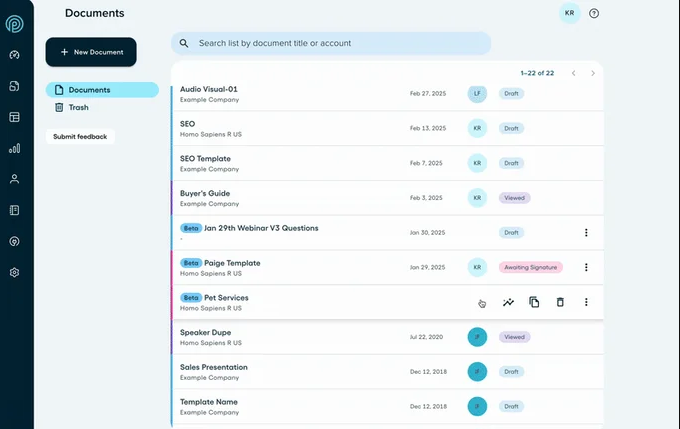
Proposify is the top choice for sales teams who need strict brand control without slowing down their workflow. While other tools focus heavily on legal compliance or just simple e-signatures, Proposify focuses on getting the deal signed. It handles the entire process, from the first draft to the final agreement, so you can send error-free, branded contracts in minutes
Our platform connects with Salesforce, HubSpot, and other CRMs to pull data right into your documents.
You can also set strict permissions. Your legal team can lock down liability clauses and terms, while your sales reps still have the freedom to customize the pricing and cover letter.
Key Features
- Workflow Automation: You can set up automatic approval loops so deals move forward without getting stuck in someone's inbox.
- Interactive Editor: Create polished, on-brand contracts with design flexibility that other tools can't match.
- Engagement Analytics: Track every move your prospect makes on the document. Know who is looking, for how long, and when.
- CRM Integrations: Sync data two-way with tools like Salesforce and HubSpot to automate your workflow.
- Built-in E-Signatures: Legally binding electronic signatures are included, so clients can sign immediately on any device and you don’t have to pay for an additional software tool. .
Pricing
Proposify offers a 14-day free trial before spending a dime.
- Basic ($19 per mo): Perfect for small businesses that just need the basics, like e-signatures and dynamic pricing.
- Team ($41 per mo): Built for growing squads. Adds integrations, custom variables, and auto-reminders.
- Business ($65 per mo): The full-scale operation. Includes approval workflows, role permissions, and SSO.
Check our pricing page for a detailed plan comparison.
Pros
- Responsive support team that actually helps.
- Contracts look polished and on-brand.
- Proposal analytics show exactly when a client reads your proposal.
- Locks down legal terms so reps can't make mistakes.
- Implementation service builds your templates for you.
Cons
- Initial setup takes a bit of time to learn.
2. PandaDoc
PandaDoc is best for teams that need to manage paperwork across the whole company, not just sales. Its drag-and-drop builder ends the struggle of Word formatting, allowing you to create professional proposals and quotes quickly without a designer.
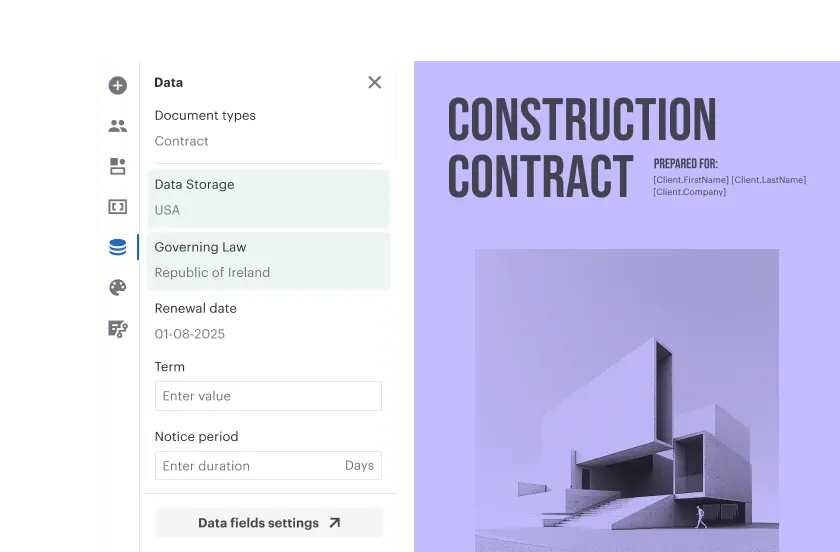
You get real-time tracking to see exactly when someone opens your document plus automated reminders to keep deals moving without manual admin work.
Key Features
- Drag-and-Drop Editor: Create documents easily using pre-built templates and media blocks.
- Document Tracking: Get real-time notifications when recipients open, view, or sign your files.
- Workflow Automation: Set up approval paths and automated reminders to keep deals moving.
- Content Library: Store approved clauses and images to use in future contracts (Business plan and up).
Pricing
- Free e-sign ($0): Includes unlimited signatures but limits you to sending 60 documents per year.
- Starter ($19 per user/month): Adds unlimited document sending and access to templates.
- Business ($49 per user/month): Adds custom branding, CRM integrations, and approval workflows.
- Enterprise (Custom): For large teams needing SSO, API access, and notary services.
Pros
- The free plan covers essential e-signatures.
- The editor is user-friendly and intuitive.
- Annual billing saves up to 46%.
Cons
- Pricing is complicated by paid add-ons.
- Scaling gets expensive due to per-user costs.
3. Sirion
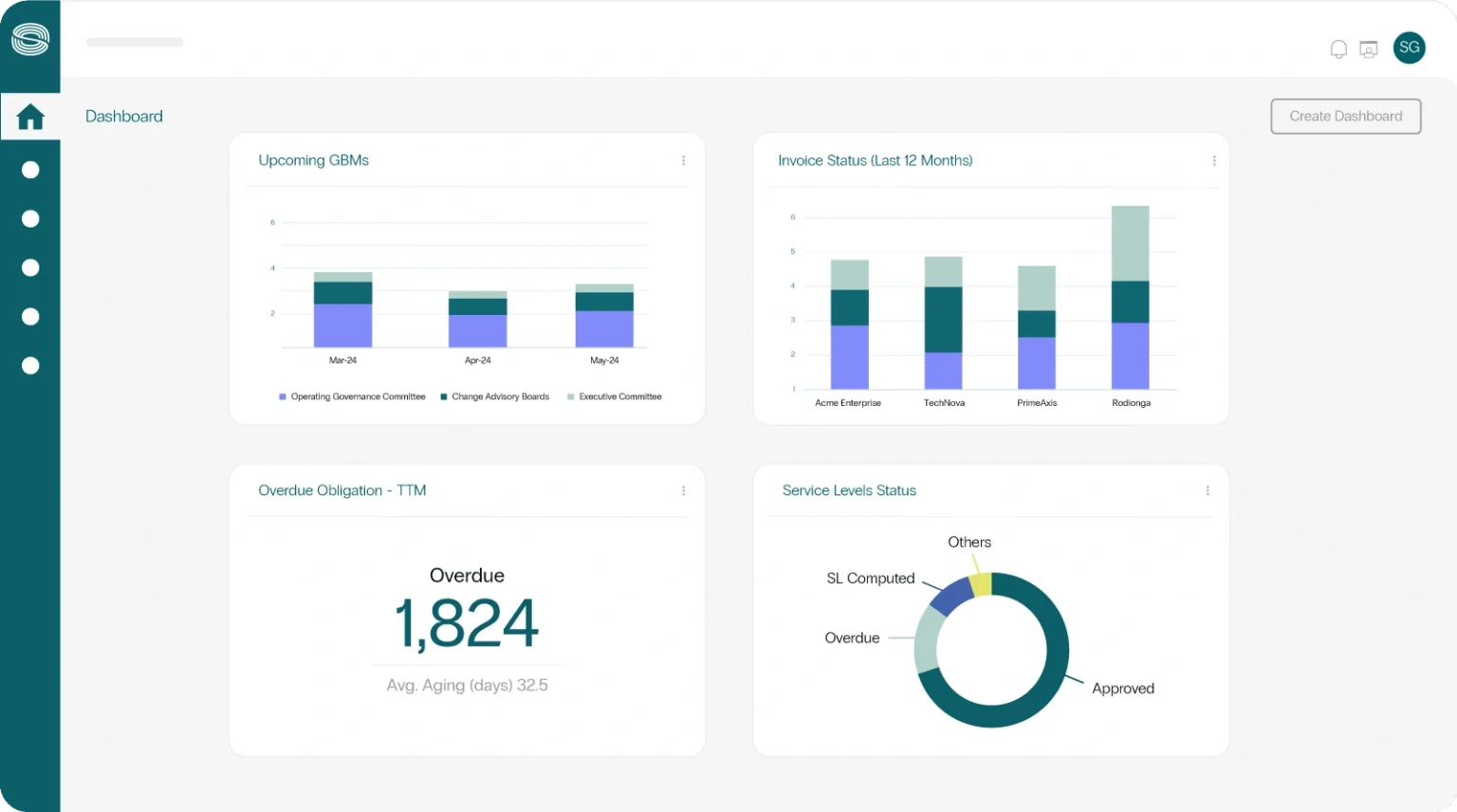
Sirion is best for large enterprises needing deep AI analysis. Built entirely around smart AI, the software acts like a digital legal assistant that reads, reasons, and acts on your contract data.
Instead of navigating endless menus, you can use the AI conversational interface to ask plain questions about your deals. The system also automates redlining by checking incoming contracts against your playbook to suggest safer terms instantly.
Key Features
- Automated Redlining: The AI flags risks, and suggests compliant edits based on your rules.
- Explainable AI: Cites the specific source for every suggestion, so you understand exactly why a clause was flagged.
- Obligation Tracking: Monitors deliverables and deadlines after the signature to prevent revenue leakage.
- Deep Integrations: Connects seamlessly with ERPs like SAP, Oracle, and CRMs to align finance and sales.
Pricing
- Custom Enterprise Quotes: Costs depend on deployment scale, data volume, and specific AI modules. You must book a demo for a quote.
Pros
- AI automatically redlines incoming contracts to catch risks instantly.
- Transparent AI logic explains exactly why a clause was flagged.
- Deep integrations keep your data clean and consistent.
Cons
- Too complex and expensive for small teams with simple needs.
- Implementation is a long project, not a quick setup.
4. LinkSquares
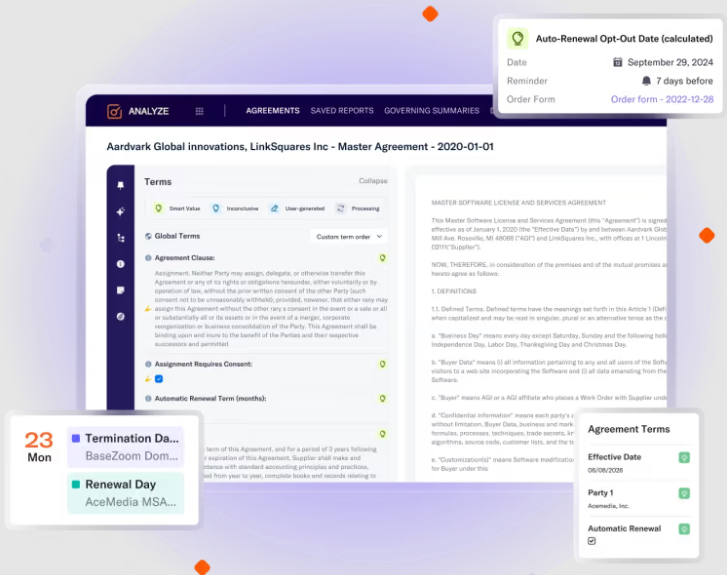
LinkSquares is the best choice for legal teams that need to speed up approval times without losing control. It puts your General Counsel in the driver's seat to ensure compliance while connecting directly to Salesforce.
This allows your reps to get deals approved without ever leaving their CRM. The platform uses AI to draft and analyze contracts instantly to create a central command center. It turns your contract data into faster revenue and proves that legal can actually help you close deals faster.
- Legal-First AI Agents: Native AI trained by legal pros to draft, review, and extract data better than generic tools.
- Custom Workflows: Automates approvals and routing so contracts don't get stuck in email purgatory.
- Collaboration Hub: Lets sales, finance, and legal work on the same draft without messy document transfers.
Pricing
- Custom Quotes: Pricing is tailored to your needs, so you have to chat with sales to get a price.
Pros
- AI agents are trained on legal data for better accuracy.
- Combines drafting, signing, and storage in one seamless platform.
- Reduces time-to-sign by removing manual roadblocks.
Cons
- Might be overkill for small teams without a dedicated legal department.
- Focus on legal compliance might feel heavy for simple sales cycles.
5. Contractbook
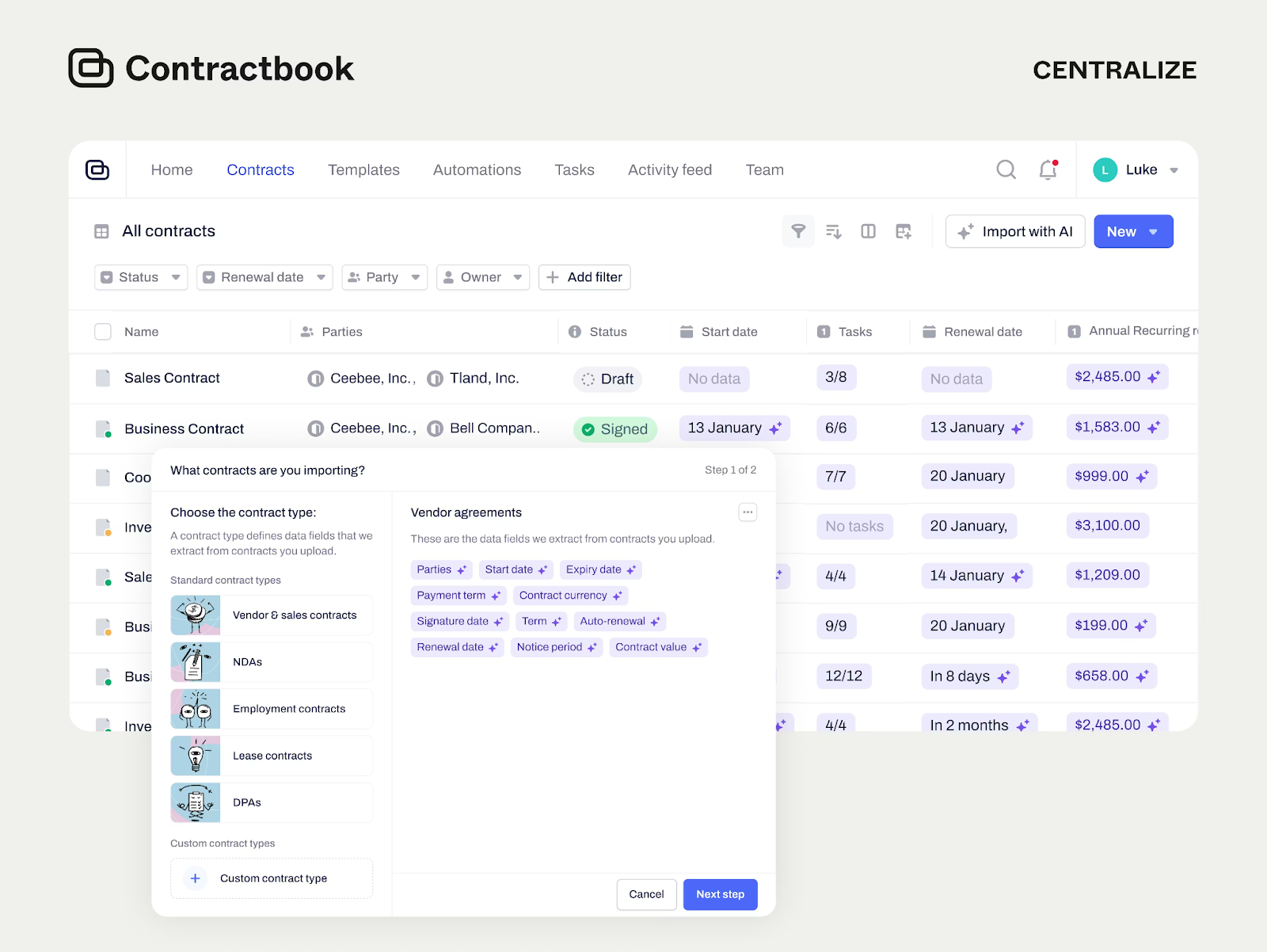
Contractbook is best for teams that want to automate the busy work that happens after a deal is signed. The platform centralizes drafting, negotiating, and signing, so you stop emailing different versions back and forth. Its AI scans your documents to extract key dates and obligations so you never miss a renewal deadline.
Key Features
- Automations: Trigger tasks and reminders automatically when a contract status changes.
- AI Assistant: Extract data, summarize terms, and identify risks in plain English.
- Centralized Repository: Keep every client and vendor agreement in one organized, searchable dashboard.
- Collaborative Editor: Negotiate and approve changes with your team directly in the document.
Pricing
Requires a demo for pricing, but you can test it out with a 14-day free trial. If you don't upgrade by the end, your account simply reverts to a limited free plan.
- Essential: Includes 1 user and up to 100 signed contracts a year.
- Centralize: Includes 5 users, 350 signed contracts, and AI data extraction.
- Accelerate: Includes 10 users, 500 signed contracts, and the all-important Salesforce integration.
Pros
- Centralizes drafting, signing, and storage in one hub to reduce tool switching.
- Automations reduce the manual admin work required after a signature.
- AI extracts key data and risks automatically to keep you compliant.
Cons
- The number of signed contracts is capped on every plan.
- Advanced automation features are locked behind the highest-tier Accelerate plan.
6. Ironclad
Ironclad is best for mid-to-large teams that need to handle complex contracts without slowing down the sales cycle. It connects legal, procurement, and sales in one spot to end the dreaded email chain, handling the heavy lifting of compliance while your team works where they are comfortable.
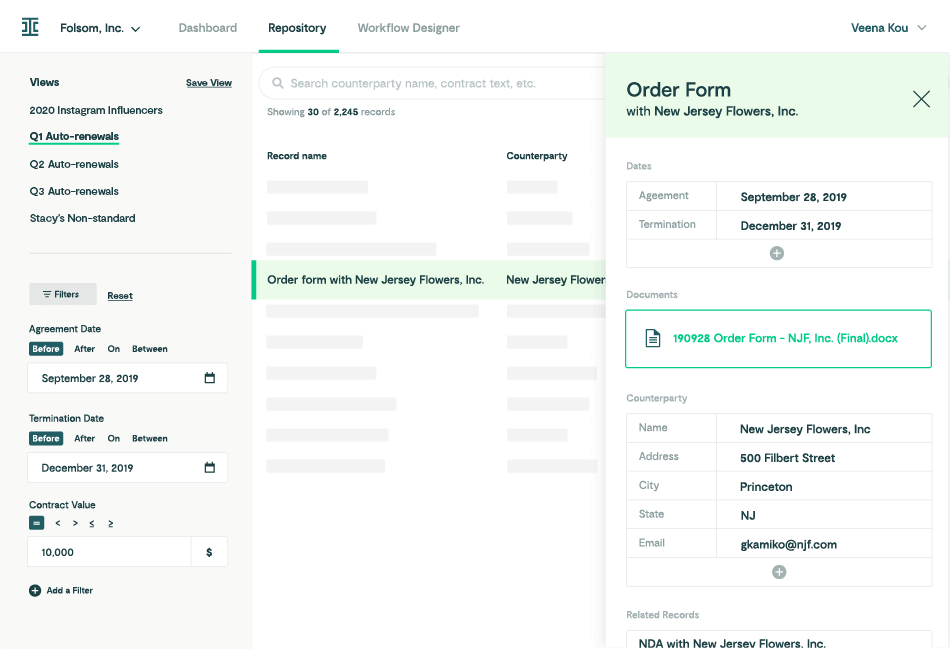
Ironclad has an AI assistant, Jurist, which helps you draft and review documents in seconds. It integrates natively with tools like Salesforce and Slack so nobody has to switch tabs.
Key Features
- Workflow Designer: A no-code tool that lets you build custom approval processes without calling IT.
- Digital Repository: Centralizes every NDA and service agreement to give you a single source of truth for your data.
- Clickwrap & High Volume: Streamlines standard agreements like NDAs and employee contracts to keep the business running smoothly.
Pricing
- Custom Quotes: Ironclad offers custom enterprise pricing. You must request a demo to get a specific price for your organization.
Pros
- The interface is intuitive and simple to use.
- Jurist AI acts like a legal assistant to spot risks and draft clauses for you.
- Deep integration with Salesforce means you can drive deals without changing windows.
Cons
- Pricing is not transparent and requires going through a sales cycle.
- Implementation is a structured process, which suggests it might take time to set up.
- Too robust and expensive for small businesses with simple needs.
7. Juro
Juro is best for legal and commercial teams at high-growth companies who need to agree on contracts fast. It replaces the mess of Word, email, and PDFs with a single browser-based platform where you can create, negotiate, and sign without ever switching tabs.
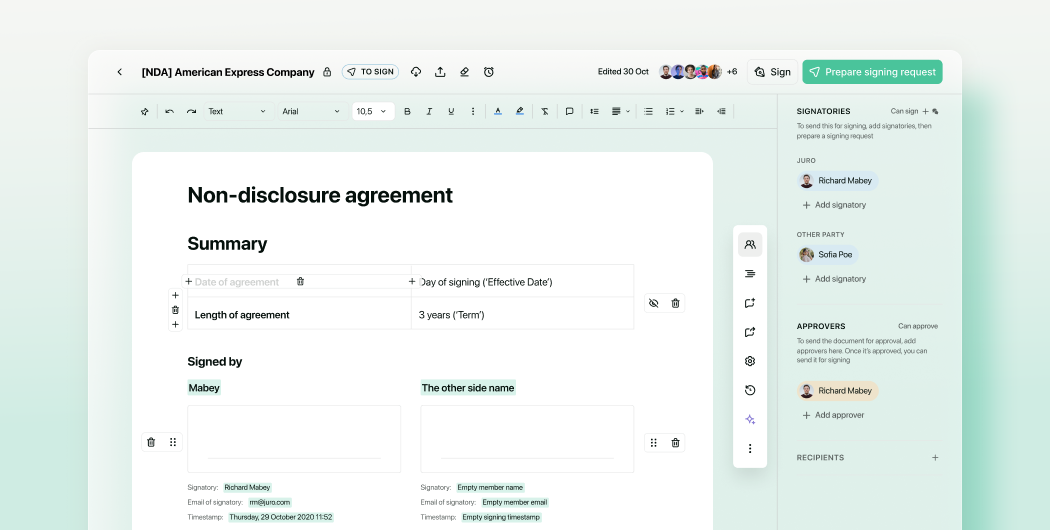
The software helps teams self-serve on routine contracts using pre-approved templates, so legal doesn't have to be the bottleneck for every deal.
Key Features
- AI Contract Review: Instantly flags risks and non-standard terms against your playbook to speed up approvals.
- Native E-Signature: Sign legally binding agreements on any device without paying for a separate tool like DocuSign.
- Conditional Logic: Build smart templates that automatically adjust terms based on the deal size or region.
- Smart Storage: Centralizes all signed contracts and uses AI to extract renewal dates and obligations for you.
Pricing
- Custom Package: You need to book a consultation to create a package that fits your business.
Pros
- The interface is quite easy to use.
- Includes native e-signature, saving you the cost of a separate subscription.
- Implementation is significantly faster than traditional enterprise CLM tools.
- Excellent customer support with fast response times.
Cons
- Complex custom formatting can be trickier than in Microsoft Word.
- Recurring automated reminders (e.g., for annual renewals) can be limited compared to heavy enterprise tools.
8. CobbleStone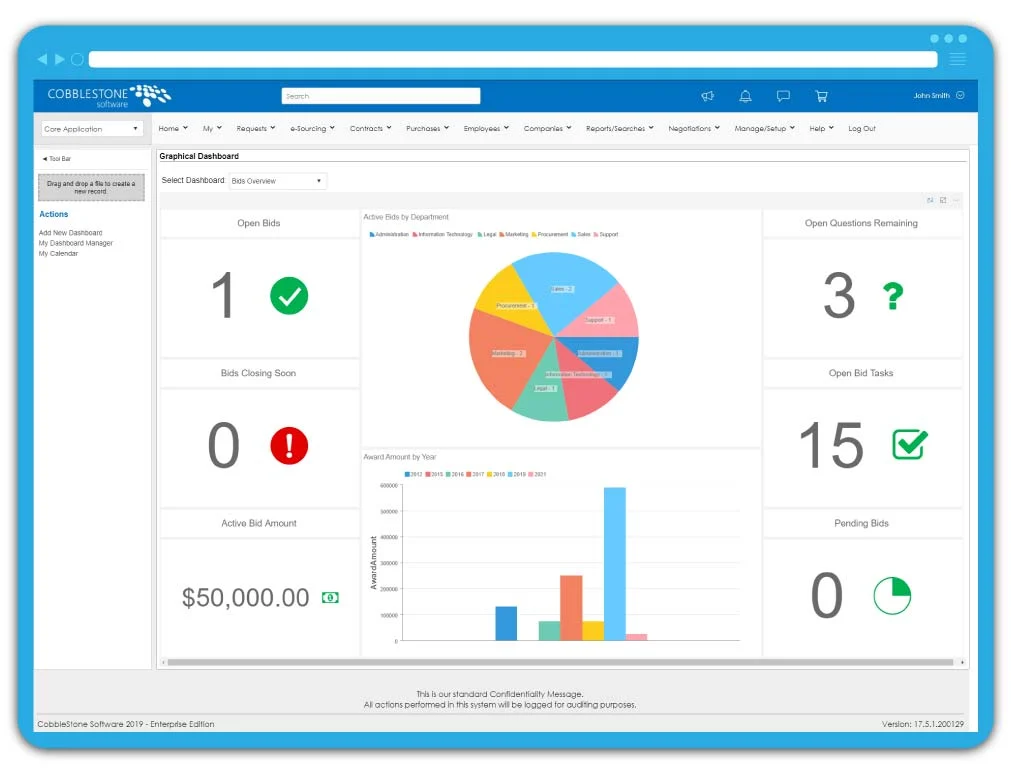
CobbleStone is best for organizations that want to build things their own way. It is a highly flexible system that bends to fit your process, rather than forcing you to adapt to a rigid tool. It handles the entire lifecycle from request to renewal, ensuring you can scale the software easily as your business needs change.
Key Features
- VISDOM AI: Analyzes contracts to identify opportunities and mitigate risks proactively.
- Auto-Redline: Automatically inserts favorable clauses from your library to ensure every contract meets your standards.
- Vendor Management: Tracks supplier scorecards, insurance certificates, and workflows in one central hub.
- Procurement Suite: Manages the full purchasing cycle, including budget levels, spend tracking, and online bidding.
Pricing
- 30-Day Free Trial: You can request a 30-day trial to test the AI and workflow features before committing.
- Custom Quote: Pricing is tailored to your specific needs and scale.
Pros
- Configurable workflows allow you to map the software exactly to your business processes.
- VISDOM AI offers proactive recommendations rather than just passive storage.
- Includes robust procurement and bid management tools.
- Auto-redlining speeds up negotiations by swapping in pre-approved language automatically.
Cons
- The platform is packed with features that might feel overwhelming for users who just need a simple e-signature tool.
- Being fully configurable means you will need more time upfront to set up the system exactly how you want it.
9. DocuSign CLM
DocuSign CLM is best for enterprise teams that need rock-solid compliance and security above all else. Aside from simple signatures, it handles the entire contract lifecycle, letting you generate contracts with dynamic templates that auto-populate data from Salesforce.
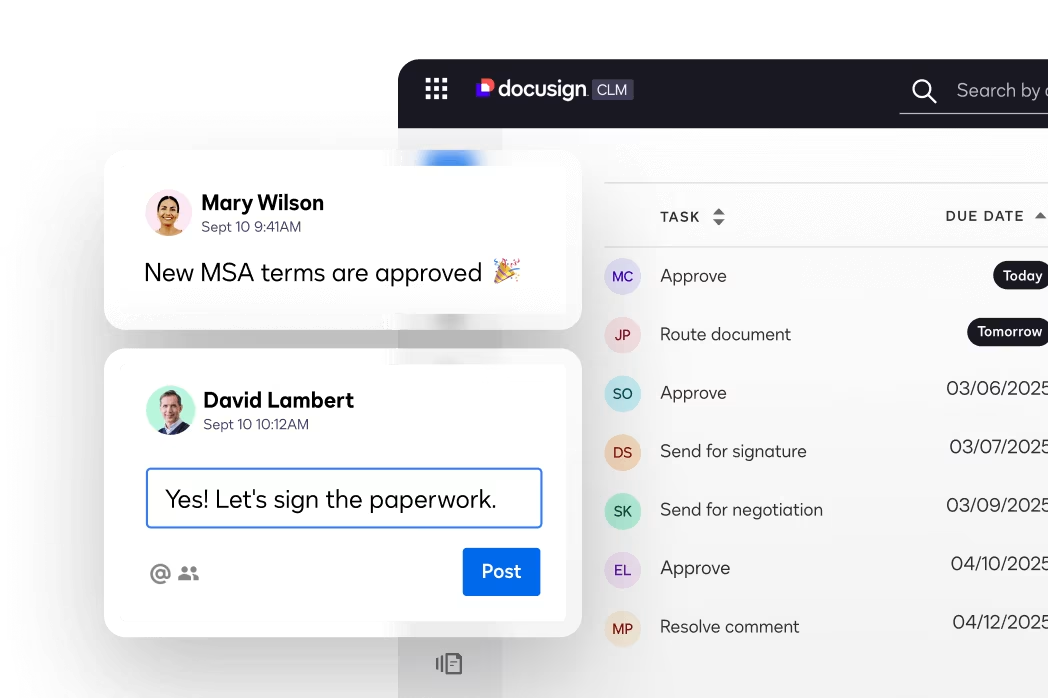
The platform uses AI to flag non-compliant clauses before the contract leaves your desk. Once the contract is sent, you can track every version and approval step in a central repository, so you have a perfect audit trail for legal and HR.
Key Features
- AI Repository: Centralize every agreement and use AI to extract key dates and obligations for easy reporting.
- Workflow Automation: Use a drag-and-drop editor to design custom approval paths that ensure the right people sign off.
- Collaboration Tools: Route contracts for internal and external review with detailed version control and commenting.
- Native Integrations: Connects deeply with Salesforce and SAP Ariba to keep your data synchronized across systems.
Pricing
- IAM Starter ($40/user/mo): Includes AI search and 1 automated workflow. Limit of 100 envelopes per year.
- IAM Standard ($45/user/mo): Unlocks unlimited web envelopes and 3 workflows. You must buy at least 3 seats.
- IAM Professional ($75/user/mo): Adds deeper AI and 10 workflows. Also requires a 3-seat minimum.
Pros
- AI capabilities help flag risks and summarize complex agreements automatically.
- Strong audit trails and compliance features make it safe for highly regulated industries.
- Drag-and-drop workflow builder makes it easy to visualize complex approval processes.
- Integrates seamlessly with major enterprise tools like Salesforce and SAP.
Cons
- The envelope-based pricing model can get expensive if your volume spikes unexpectedly.
- Lacks the robust design tools found in proposal-focused software
10. Qwilr
Qwilr is best for sales teams that want to ditch boring PDFs in favor of interactive, web-based proposals. Instead of sending a static document that looks the same on a phone as it does on a desktop, Qwilr lets you send a responsive webpage.
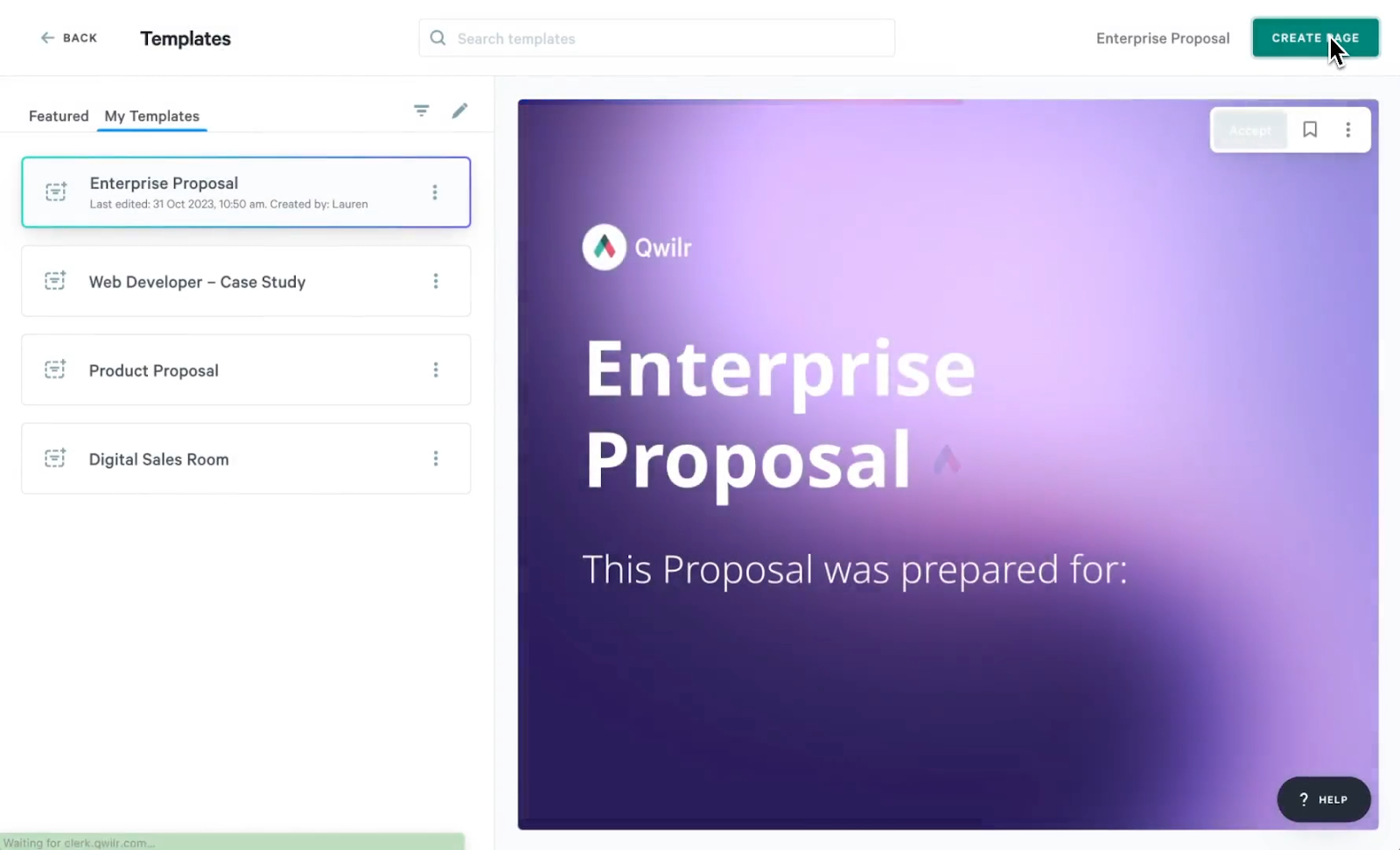
With this approach, you can include interactive pricing tables that let clients select optional add-ons or adjust quantities themselves. As they click, the total price updates instantly. Once they are happy, they can sign and pay right there on the same page.
Key Features
- Interactive Content: Embed videos, ROI calculators, and calendar links directly into the proposal to keep buyers engaged.
- QwilrPay: Collect payments instantly via Stripe or other processors as soon as the client signs.
- Identity Verification: See exactly who is viewing your proposal to keep sensitive pricing data secure.
- Real-Time Analytics: Track when a buyer opens the page, what they click, and how long they read.
Pricing
- Business ($35/ user/month): Ideal for small teams. Includes HubSpot integration, e-signatures, and payments.
- Enterprise ($59/ user/month): Built for scaling teams. Adds Salesforce integration, custom branding, and identity verification. Minimum of 10 users.
Pros
- Interactive pricing tables allow clients to upsell themselves.
- Combined signing and payment reduces the friction of closing.
- ROI calculators help prove your value directly inside the contract.
- Good integration with HubSpot for tracking deal activity.
Cons
- The web-based format can be tricky if your legal team strictly demands PDFs.
- Design options can feel limited if you try to break out of their standard grid.
Turn Contracts into Revenue with Proposify
We’ve walked through options built for heavy legal compliance, procurement, and digital filing. If your main goal is simply storing paperwork, you have plenty of choices. However, if your goal is getting deals signed, we believe Proposify is the best contract management software tool for teams.
While other platforms focus on archiving documents, Proposify gives you design freedom to stand out and real-time analytics to know exactly when to follow up. We do the heavy lifting so you can close deals quicker.
Ready to speed up your sales cycle? Book a demo today.