









Published: March 20, 2026
Updated: March 20, 2026

Quick Summary
Building a centralized sales content library can transform your team’s efficiency. A single, accessible hub keeps proposals on-brand and cuts the time reps spend searching for content. This guide walks you through setting up a scalable content library with help from Proposify’s features so your reps move faster and close deals quicker.
Why Do You Need a Sales Content Library?
If you’re reading this, chances are your team’s sales content is a bit chaotic.
A slide deck in Drive. A case study in someone’s inbox. Three versions of the same proposal template, all marked “final.”
When reps waste time on such issues, deals stall and win rates drop. They spend only about 28% of their week actually selling. The rest of the time gets consumed by admin work and internal busywork.
A single sales content library fixes that, so your team finds what they need fast and trusts it’s the right version. That means faster proposals, fewer errors, and proposals that actually look like your company.
In this guide, you’ll learn how to build a sales content library, how to structure it so reps can find what they need in seconds, and the best practices that keep it clean over time. We’ll also show how tools like Proposify’s sales content library help you stay consistent as your team scales.
Why Listen to Us?
At Proposify, we’ve helped thousands of sales teams fasten their proposal process and get deals signed. We’ve even analyzed nearly amillion proposals to pinpoint what makes sales content processes succeed. With this guide, we’re sharing those proven steps to help you save time and support revenue growth.
What Is a Sales Content Library
A sales content library is a central, organized hub where your team stores the collateral they use to move deals forward. Pitch decks, case studies, pricing tables, email templates, intro blurbs, and reusable proposal templates, everything that supports sales can be found here.
A good content library has three qualities:
- Centralized: Assets aren’t scattered across tools and inboxes.
- Structured: Teams can find what they need fast.
- Controlled: Only the right people can access or change content.
The point is speed and consistency.
A proposal is assembled from repeatable building blocks. When those building blocks live in a centralized content library, your sales team spends less time formatting and more time selling.
Step-by-Step Guide to Building an Effective Sales Content Library
A content library only saves time if it’s built with intention. Dumping every deck, doc, and PDF into a folder just creates a new kind of mess. Instead, give reps a single place to pull approved content fast, keep it current, and make it easy to scale as the team grows.
Here’s the step-by-step process to build a sales content library your team will actually use.
1. Audit and Gather Your Sales Content
Start by taking stock of all the sales content you have. This includes any content your reps use during the sales cycle. Think proposals, quote templates, case studies, pricing tables, product one-pagers, and slide decks.
Put everything into one view so you can see what’s useful, what’s duplicated, and what’s outdated. If you find five versions of last quarter’s proposal, you’re on the right track. This is a pruning exercise: archive or delete outdated pieces, and flag the current, approved versions you want people to use.
As you compile assets, note the type of each content piece and who uses it. This will help you organize it later. Remember, you can only organize what you have identified.
One Proposify customer cut proposal creation time from 20 minutes to 7 minutes after centralizing content. The few hours spent auditing saved hundreds of hours across the team.
2. Centralize Everything in a Single Content Hub
Once you’ve gathered your assets, bring them into a single, structured home. Instead of content scattered across SharePoint, Google Drive, and random folders on laptops, give your team one login and one reliable location for all sales materials.
For example, Proposify’s Content Library acts as a one-stop repository where your team can find everything they need to pull together impressive proposals fast.
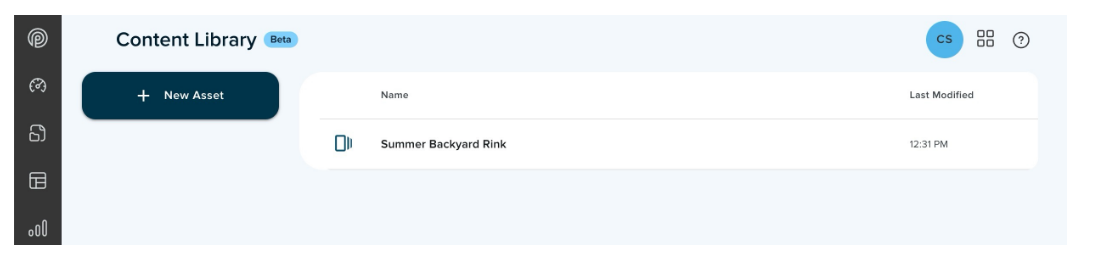
Migrate only the approved, up-to-date content from your audit and archive, or delete the junk you cleaned out in step one. For example, upload the latest version of your product overview, your current pricing table, and your best case study write-ups. Now, your sales team and anyone else in the org know: this is the official version to use.
The payoff? Your reps no longer waste time digging through files or pinging coworkers for that one slide.
3. Organize for Easy Access (Folders, Categories, Tags)
Now that your assets are centralized, give them a structure so that it makes sense for your team. Treat the sales content library like your bookshelf instead of a dumping ground.
Group similar items, label them clearly, and make sure anyone can find what they need hassle-free. Ask reps how they search for content and build your categories around their workflow.
How to organize:
- Create logical sections: Product info, pricing, customer stories, legal (T&Cs), images, templates, reusable snippets.
- Use folders + tags: Folders handle broad categories, and tags handle attributes, like product line, persona, deal stage, or region.
- Give items descriptive names: A clear convention makes content recognizable at a glance, e.g., Case Study_Industry_Client_Year.
- Store reusable snippets: Save boilerplate, company blurbs, and proposal sections as reusable content pieces, so reps can drag-and-drop instead of rewriting every time.
- Assign ownership & cadence: Give each folder an owner and set a quarterly review so content stays current.
Smart tools like Proposify let you combine folders, tags, and reusable snippets so your team always uses the right version. The goal is your team spends less time searching and more time selling.
4. Turn Key Content into Templates and Reusable Blocks
Proposals, quotes, pitches – your team often shares a lot of the same content and structure. Templatizing frequently used content ensures faster proposal creation and a consistent professional look and message every time.
Identify those documents and build templates and reusable blocks from your best content. Templates provide a starting point for your most common docs, so reps aren’t starting from a blank page each time.
For example, you might create a master proposal template that includes:
- All core sections, with cover page, About Us, case studies, pricing, T&Cs, and placeholders for custom details.
- Pre-set logos, fonts, and styles.
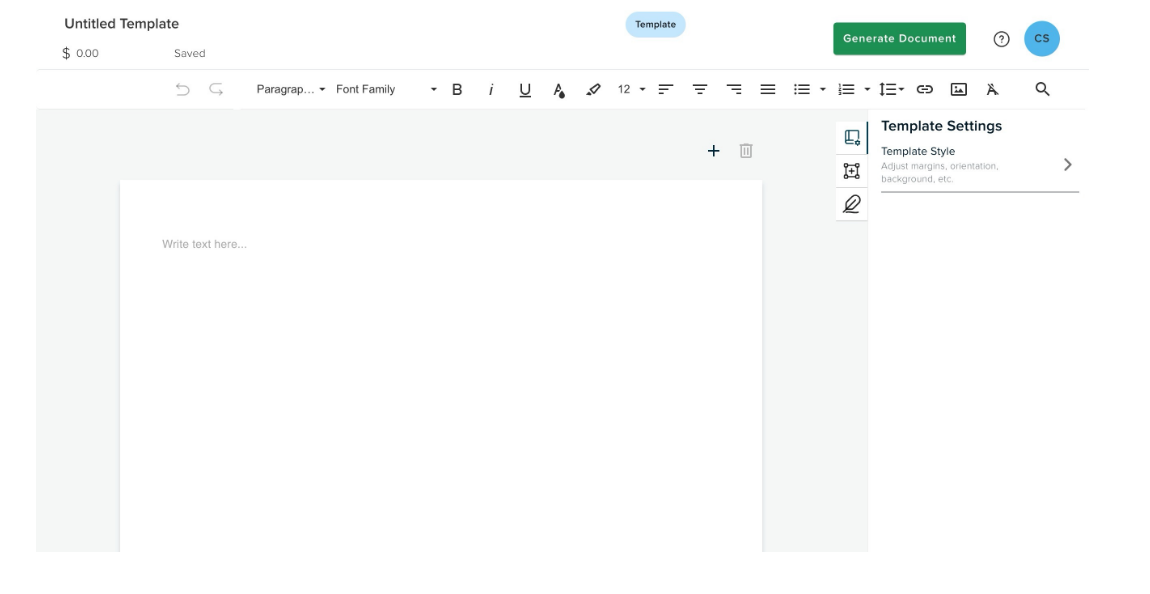
Your rep can pull up this template, tweak the few parts that need customizing, and voila – proposal done in a fraction of the time. Templates save time on writing and design because formatting and branding are preset. No more rogue slide designs or off-color logos sneaking into proposals.
Proposify’s template library is built for exactly this purpose. You can create a template once and reuse it across deals instead of building from scratch each time.
As Nick H has put it on G2, “their large library of templates gives a solid starting point” for proposals, making it easy to stay flexible while saving time.
5. Implement Role-Based Permissions and Content Controls
A sales content library is only as good as the quality of content in it. To avoid a “too many cooks” scenario, set role-based permissions for your library. Decide who on your team can add, edit, or remove content and who should stick to using the content as-is.
Give People Just Enough Access
Without permissions, you might end up right back in chaos as everyone could start tweaking or saving over your carefully curated materials.
Use tools like Proposify to lock it down. It lets you create and assign permissions by role, like Content Manager, Admin, Sales Rep, and Sales Manager.
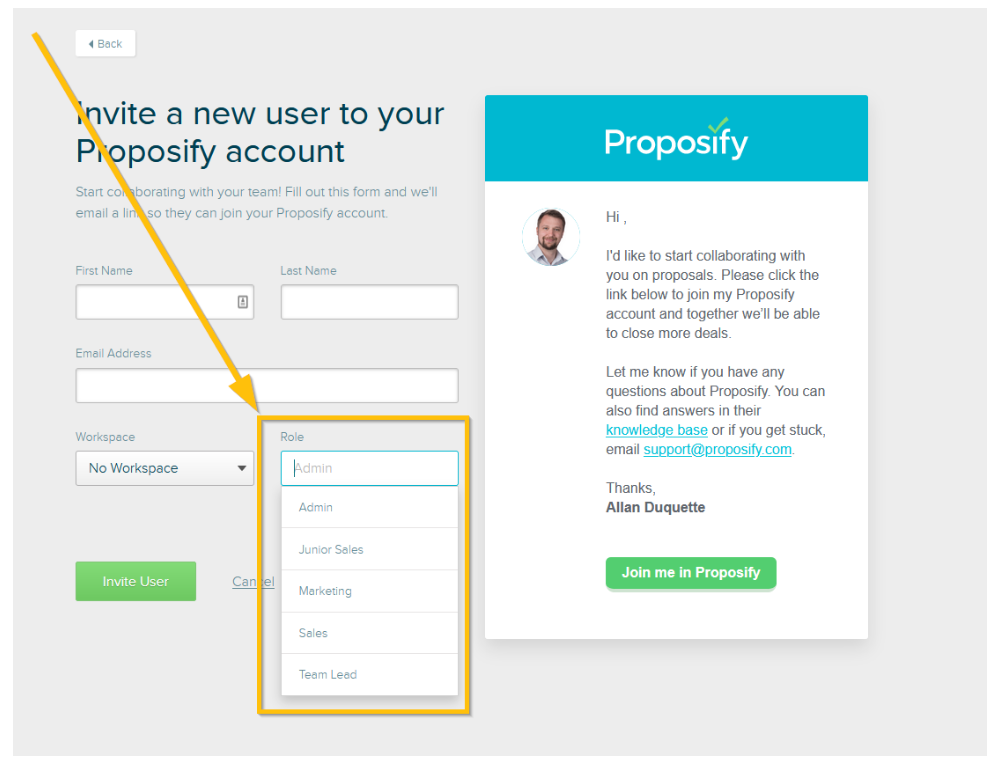
Content Managers and admins can edit and add to the library. And sales reps get to use the content, not tinker with it.
Only authorized users can update master templates or add new sections. Everyone else works from approved content. That means no more surprises where a rep accidentally overwrites the master version for everyone.
Take It Further with Folder Permissions
If you've got multiple teams or product lines, you can restrict content by folder:
- Team A only sees content relevant to their products.
- Team B sees theirs.
Nobody gets distracted by materials they'll never use, and sensitive information stays exactly where it should. In Proposify, if a rep doesn't have permission to access a folder, they won't even see it. No clutter, no confusion, and sensitive info stays confined to the right group.
According to Cameron Aiton, COO of EverLine, who implemented Proposify to give 59 franchisees a controlled content library and saw immediate results.“Proposify is absolutely worth the money. It’s been a game-changer for how we present ourselves and has massively changed our sales process for the better,” says
Best Practices for Maintaining Your Content Library
Now that you’ve built your content library, you need to keep it running like a well-oiled machine. Here are some best practices to ensure you maintain a clean, efficient content library that continues to serve your sales team as it grows:
1. Assign a Content Librarian
Designate an owner or a small team responsible for the library’s upkeep. This person should curate new content, prune outdated assets, and be the point of contact for content requests. Having a library owner means accountability for quality and consistency.
2. Schedule Regular Updates
Make content maintenance a routine. Set a quarterly or monthly calendar reminder to review the library for any outdated info, such as prices, product details, logos, etc. Remove or update anything that’s old news.
Gartner found 73% of B2B buyers actively avoid suppliers who send irrelevant outreach, which is exactly what outdated decks and stale case studies create.
3. Gather Sales Team Feedback
Your reps use the library daily, so create an easy feedback loop for them. Consider setting up a Slack channel or a monthly 15-minute meeting where reps can suggest new assets or flag hard-to-find content.
This keeps the library aligned with what the team actually needs and boosts adoption. When reps see their feedback applied, they’ll actually use the library.
4. Train and Onboard Everyone
84% of sales reps achieve their quotas when they receive a proper sales enablement strategy.
Include library training in your sales onboarding process. New reps should know from day one where to find content and how to use the library.
Do a live demo of how to build a proposal using the sales content library and stress that it’s the go-to resource. Periodic refresher training for the whole team can help too, especially when you roll out new features or templates.
5. Keep It Simple
Avoid over-categorizing or burying assets in dozens of subfolders. Aim for a structure where any asset is findable within three clicks or by a quick search. Remember, the library is there to make life easier. If users have to drill through six levels of folders, simplify it.
Turning Chaos into Closed Deals
Building a sales content library is about letting your team sell smarter, not harder. Centralizing content, using templates and snippets, and controlling quality with permissions help you remove the friction that slows deals. Instead of proposal chaos, you’ll have proposal cadence.
Remember, the point of all this is to save your team hours and win more deals. Reps won’t have to hunt for the latest case study or second-guess a pricing table; everything’s accurate and ready to go. That means faster turnaround, more consistent messaging, fewer mistakes, and a better buyer experience.
If you’re curious to see how Proposify’s platform can help organize your content library, connect with us. Our team can walk you through setting up templates, libraries, and permissions in a personalized demo.

![The 8 Essentials of a Successful Sales Playbook [+ Free Guide]](https://www.proposify.com/hs-fs/hubfs/Imported_Blog_Media/blog-2018-09-26-sales_playbook_free_template.jpg?width=450&height=250&name=blog-2018-09-26-sales_playbook_free_template.jpg)