







Published: March 23, 2026
Updated: March 23, 2026

Quick Summary
GetAccept is built to support proposals, contracts, and buyer engagement, but plan limitations and add-ons can restrict how teams use it day to day. This guide reviews GetAccept’s pricing, real costs, and limitations, then explains why Proposify is the better alternative.
Is GetAccept Pricing Actually Transparent?
GetAccept publicly lists its pricing plans. Prices are shown per user, and the upgrade plan is clear on paper. What is less obvious is whether those plans align with how teams actually function.
Simply listing a price is one thing. However, when it comes to GetAccept, the big question is: Does the functionality in each plan mirror what sales teams require today?
Some teams will use most of what is bundled in higher-tier plans. Others may find themselves paying for capabilities they rarely use, while still missing a few things they care about.
When examining GetAccept pricing, you need to look beyond the headline numbers. The focus is not simply on how much each plan costs, but whether the functionality included in each tier justifies that cost for your specific workflow.
Why Listen to Us?
At Proposify, proposals are at the core of what we design and support. We have worked with thousands of sales teams and revenue leaders who depend on proposals every day and need their brand proposals to be precise, consistent, and easy to manage. Our perspective is grounded in real-world use and informs how we evaluate pricing clarity and functionality across tools.
What Is GetAccept, and Who Is It Built For?
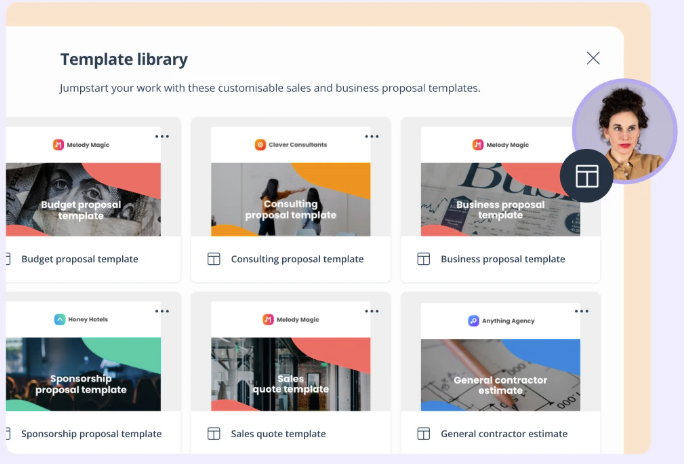
GetAccept is an all-in-one digital sales room and sales engagement platform. It is built to help sales teams manage deals, contracts, proposals, and buyer interactions in a single platform. The platform allows sales reps to choose business proposal templates from the library without the need to create new proposal designs themselves.
GetAccept is generally used by B2B sales and revenue teams that want:
- A central hub for proposals, contracts, and buyer engagement
- Integration with CRM systems such as Microsoft Dynamics or HubSpot
- Insights into buyer behavior and document interaction
Although GetAccept supports basic document workflows and eSignature at its entry level, smaller teams with simple proposal needs may find sections of the platform broader than necessary.
Key GetAccept Features
Here are the capabilities you’ll see across GetAccept pricing plans:
- Proposal and document tools: Support creating, sending, and managing sales documents, including quotes, contracts, and proposals.
- E-signature: Includes legally binding electronic signatures. Let sellers close deals without switching to a separate signing tool.
- CRM integration: Connects with major CRM systems such as HubSpot, Salesforce, and Microsoft Dynamics.
- Automated reminders and workflows: You can send automated reminders and set fundamental workflow actions to keep deals moving without the need for constant manual intervention.
- Reporting and analytics: You get access to reporting tools that show document performance, engagement rates, and user activity.
GetAccept Pricing Plans Breakdown
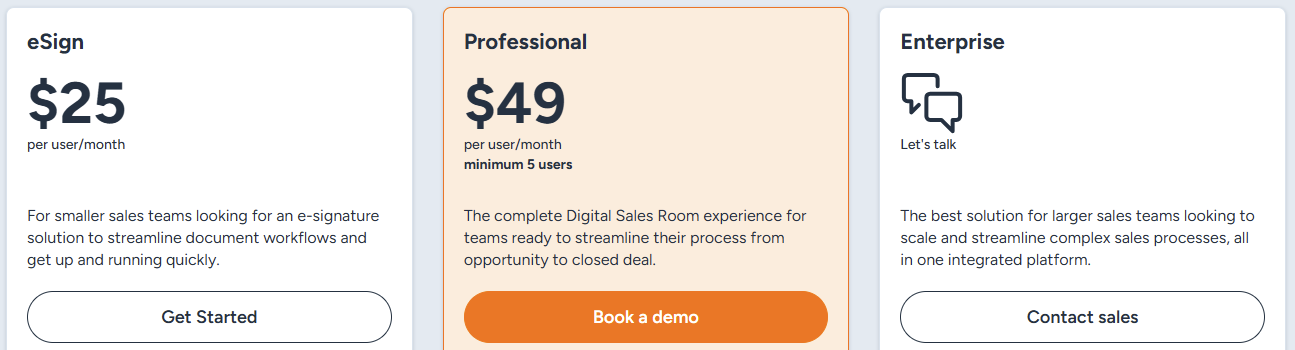
GetAccept offers three pricing tiers, with each tier unlocking a broader set of functionalities. It also offers a free trial, although they don’t state how long it lasts. Here’s what the plans look like at a glance.
|
# |
Feature / Usage |
eSign |
Professional |
Enterprise |
|
1 |
Pricing |
$25 per user/month |
$49 per user/month |
Custom |
|
2 |
Users included |
Unlimited |
Max. 5 users |
Custom |
|
3 |
Deal rooms |
– |
Unlimited active rooms |
✓ |
|
4 |
Teams & entities |
– |
– |
Add-on |
|
5 |
Communication templates |
1 |
4 |
Unlimited |
|
6 |
Unlimited AI content |
– |
Add-on |
Add-on |
|
7 |
Content library |
– |
✓ |
✓ |
|
8 |
Branding options |
Simple logo branding |
Custom colors & backgrounds |
Advanced branding + HTML emails |
|
9 |
Attachments |
– |
Single attachments |
Advanced workflows |
|
10 |
Product library items |
– |
3 |
Unlimited |
|
11 |
Conditional content |
– |
Add-on |
✓ |
|
12 |
SSO / SAML |
– |
Add-on |
✓ |
|
13 |
CRM integrations |
Add-on |
Add-on |
Add-on |
|
14 |
API write access |
– |
Add-on |
Add-on |
|
15 |
Support |
Chat + help center |
Chat + help center |
Chat + help center |
|
16 |
Dedicated CSM |
– |
Add-on |
Add-on |
eSign
eSign is GetAccept’s entry-level tier. It is built for teams that primarily require an e-signature solution to refine their document workflows.
Here are the functionalities that eSign supports:
- Usage: Unlimited electronic signature and 5 users
- Engagement: Automated reminders, video recording, and 1 communication template
- Content and branding: Simple branding with logo
- Integrations: CRM and other integrations are available as add-ons
Professional
The Professional plan is positioned as GetAccept’s complete digital sales room experience for active teams. It expands beyond signing into buyer engagement. This plan includes all features in the eSign plan.
Here are the extra features the Professional plan supports:
- Usage: Unlimited users and active rooms, and entities as an add-on
- Engagement: File sharing, live-link send-out, edit after send, and 4 communication templates
- Content and branding: 3 product library items, custom in-app color schemes + backgrounds, and 5 custom fields
- Tracking and analytics: Document tracking and insights, and reporting sales analytics
- Integrations: HubSpot, Pipedrive, UpSales, and LimeGo
Enterprise
The enterprise plan is ideal for larger sales teams looking to scale and refine complex sales processes. Its price is customized based on organizational needs and usage.
Here are the functionalities included in this plan:
- Usage: Unlimited electronic signatures, users, and active rooms
- Engagement: Mutual action plans, SMS delivery + reminders, and unlimited communication templates
- Content and branding: Custom branding + HTML email templates, advanced attachment workflows, and unlimited product library items
- Tracking and analytics: Document tracking and insights, and reporting sales analytics
- Integrations: HubSpot, Pipedrive, UpSales, LimeGo, Microsoft Dynamics, SuperOffice, Lime CRM, and APIs.
GetAccept Pricing Pros and Cons
Pros
- Flexible feature expansion as needs arise
- Scales with complex sales needs
- Unlimited electronic signatures across plans
Cons
- Many features require add-ons, which can inflate the total cost
- The Professional plan has a minimum user requirement. You may need to pay for more seats than you actively use to access it.
- Enterprise pricing is not fixed upfront. Makes it harder to estimate long-term costs
Hidden Costs and Pricing Limitations of GetAccept
GetAccept lists its pricing publicly, but some costs only become clear after teams start using the platform.
- Add-ons increase the total cost: Features such as CRM integrations, single sign-on, and advanced controls are often sold separately. This can push costs higher than the listed plan price.
- Minimum seat requirements: The Professional plan requires a minimum number of seats. Smaller teams may end up paying for users they do not actively need.
- Plan-based feature restrictions: Some features available during trials or demos are limited to higher plans or add-ons. This can force teams to upgrade sooner than expected to keep the same setup
- Enterprise pricing is not listed upfront: Enterprise plans require a sales conversation to get a quote. This makes it harder to estimate long-term costs upfront.
Best GetAccept Alternative: Proposify
Proposify is the best GetAccept alternative built for proposal creation, management, and visibility. It stands out because of how it approaches proposals, pricing transparency, and scalability.
Key Proposify Differentiators
Proposify is built specifically for proposal workflows, not as a secondary feature within a broader sales enablement platform.
Here are its key differentiators:
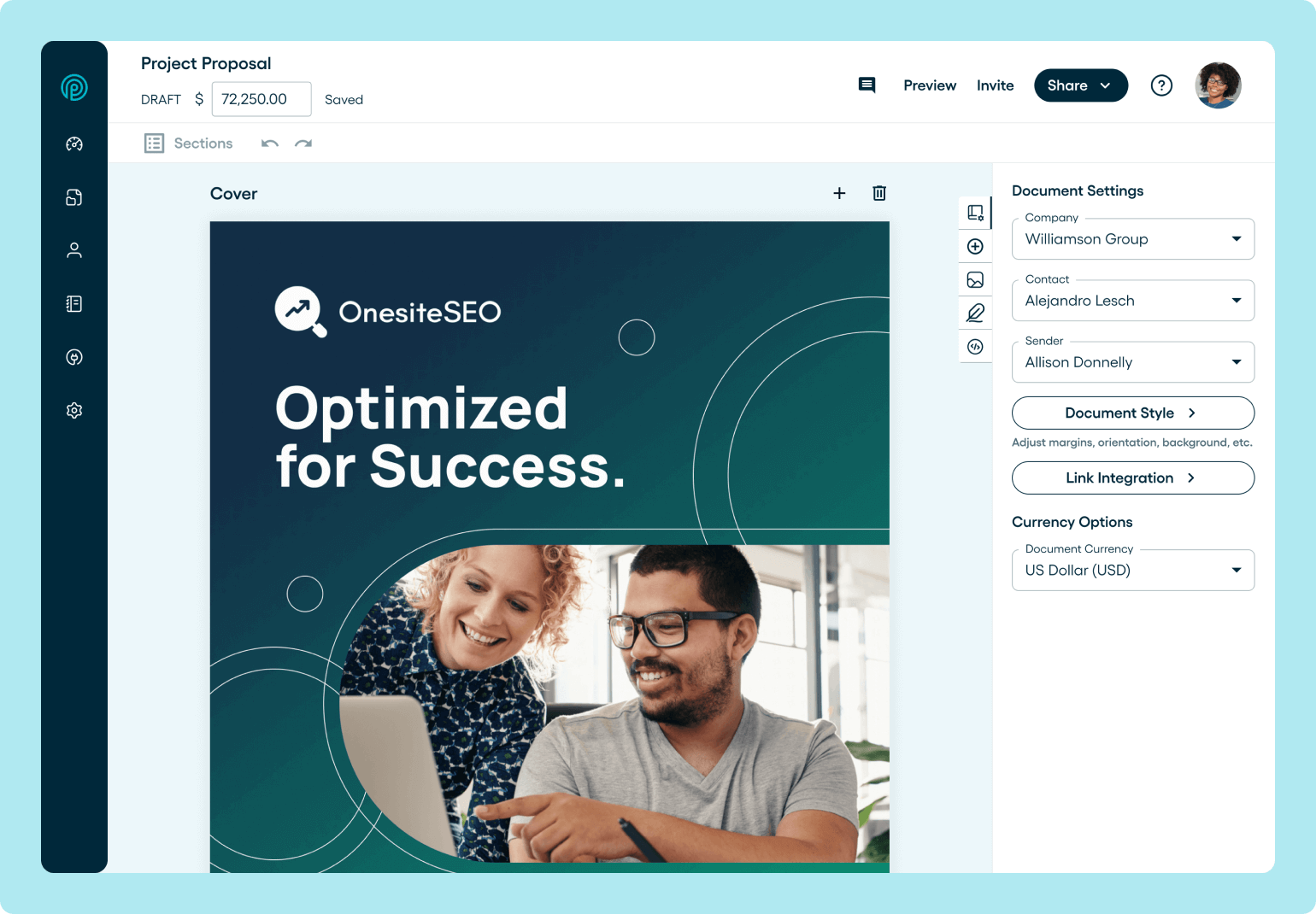
- Design flexibility others can’t match. You can create polished, on-brand proposals using flexible layouts instead of rigid templates.
- Granular permission controls: Allows you to lock individual sections, pricing tables, and terms by role to prevent unauthorized changes.
- Proposal-first platform: Proposals are the core product, not an add-on to deal rooms or sales engagement tools.
- Transparent pricing model: Includes core proposal functionality within plans, rather than splitting across multiple feature add-ons.
- Free collaborator seats: All plans include a set number of free collaborator seats for occasional contributors, with additional seats available for $8 per month.
Proposify Pricing
Proposify’s pricing is clearly structured to keep core functionalities accessible.
It uses a tiered pricing model designed to support growing sales teams without introducing unnecessary complexity. You understand costs upfront and plan as you scale.
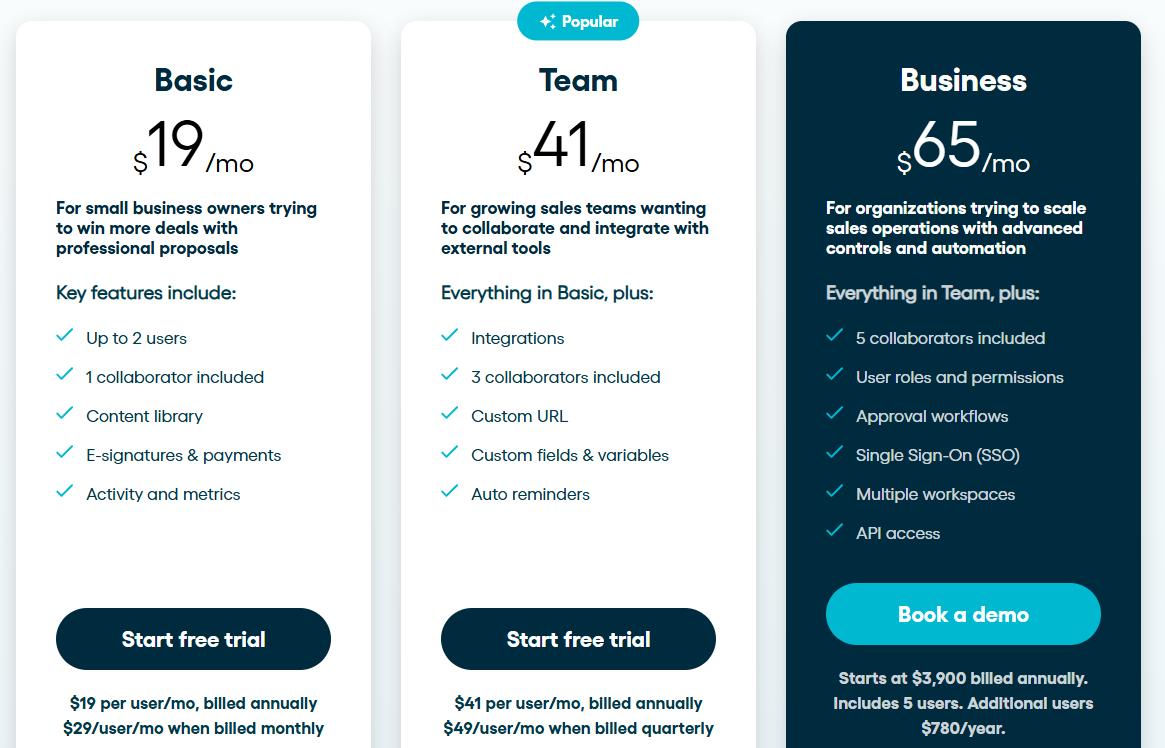
Here’s how the pricing plans look:
Proposify Pricing Plans Features Explained
Basic
Proposify’s Basic plan is the most affordable option for teams that need a simple way to create and send proposals. Pricing starts at $29 per user per month. Get up to 4 months free on the annual plan at $19/user/month.
Features:
- Document creation & e-Signatures: Unlimited templates, online signatures, content library, 5 document sends/month, and 1 collaborator seat
- Integrations & API: Stripe integration
- Customer success: Email and chat support
Team
The Team plan is where Proposify becomes more practical for day-to-day sales work. It starts at $49 per user per month. Sign up for the annual plan and get roughly 20% off at $41/user/month.
Features:
- Document Creation & E-Signatures: Custom domain, client input forms, unlimited document sends, and 3 collaborator seats.
- Integrations & API: >Integrations with popular CRMs
- Process and Control: Custom field and variables, and auto reminders
- Customer success: Email and chat support
Business
The Business plan is designed for teams that need greater oversight and control as proposal activity scales. Pricing starts at $65/user/month.
Features:
- Document creation & e-Signatures: Advanced document creation, e-signatures, and 5 collaborator seats
- Integrations: Native Salesforce and HubSpot integrations
- Process and Control: Approval workflows, workspaces, and API access
- Customer success: Phone and Zoom support, success manager, and premium integration support
Outcomes Proposify Users See
Teams that switch to Proposify typically do so to improve speed, consistency, and visibility across their proposal process.
Here are the common outcomes:
- Faster proposal creation, reducing sales cycle length
- Higher win rates driven by professional, interactive proposals
- Brand consistency across every rep, team, and location
- Clear visibility into buyer engagement, including views and time spent
- Reduced risk from pricing errors and outdated terms
- Improved efficiency, with less time spent formatting and chasing approvals
Pros and Cons of Proposify Pricing
Pros
- Transparent, all-inclusive pricing with core proposal features included
- Proposal-first platform with strong design flexibility and brand control
- Granular permission controls to reduce pricing and compliance risk
- Built-in engagement analytics for clear proposal visibility
- Free collaborator seats for occasional contributors, with extra seats available for $8 per month
Cons
- Advanced workflows are limited to higher plans
- Deep CRM integrations depend on the plan level
A More Transparent Way to Scale Proposals with Proposify
GetAccept pricing is structured around tiers, with several capabilities offered as add-ons or reserved for higher plans. To understand total cost, you need to review plan differences alongside any extra components your team may need, such as advanced controls, integrations, and expanded functionality.
Proposify approaches proposal software from a narrower scope. Core proposal components, including design, approvals, and engagement visibility, are included within its plans, rather than split across separate add-ons.
For teams comparing proposal software with a focus on pricing clarity and specific functionality, Proposify offers a more direct alternative to GetAccept.
This comes with on-brand proposal design, granular permission controls, built-in engagement analytics, and collaborator seats.
Book a demo today to see how this works in practice.