







Published: March 23, 2026
Updated: March 23, 2026

Quick Summary
Responsive.io won't tell you what their software costs. Not on their website, at least. You have to sit through multiple demos and hand over your company details. Even then, pricing can vary wildly, depending on negotiation. According to Vendr data, this could be up to $14,000 per year.
Is Responsive.io the Right Choice for Your Team?
Responsive.io excels at helping enterprise teams (with the budget to afford it) manage high-volume, complex RFP processes.
If that’s you, great.
But if you're a lean startup, or a mid-sized sales team whose primary focus is creating and sending proposals—not managing enterprise-grade RFP workflows—Responsive.io’s complexity and opaque pricing model can feel like overkill.
Setup takes time, pricing is hard to pin down, and many features unlock only at higher tiers. For growing teams, that often means paying for complexity before you’re ready for it.
This Responsive.io pricing guide outlines what to expect with each tier, highlights hidden costs, and explains why Proposify offers a simpler, budget-friendly alternative.
Why Listen to Us?
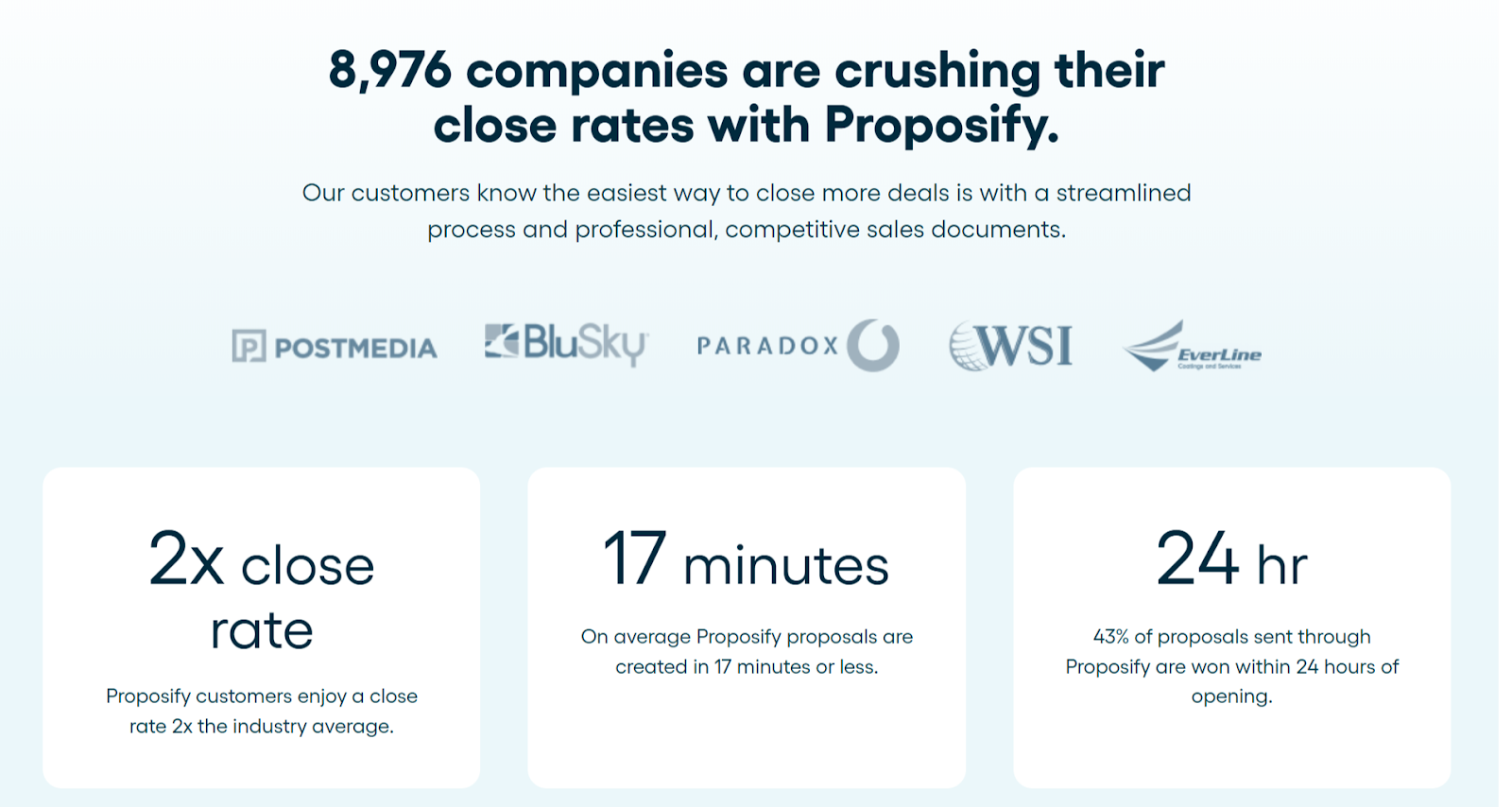
Many teams comparing us to Responsive.io need professional proposals that close deals, not enterprise RFP management. We've helped 8,900+ companies do exactly that, with transparent pricing, quick setup, and zero complexity overhead. That's why this comparison exists.
What is Responsive.io?
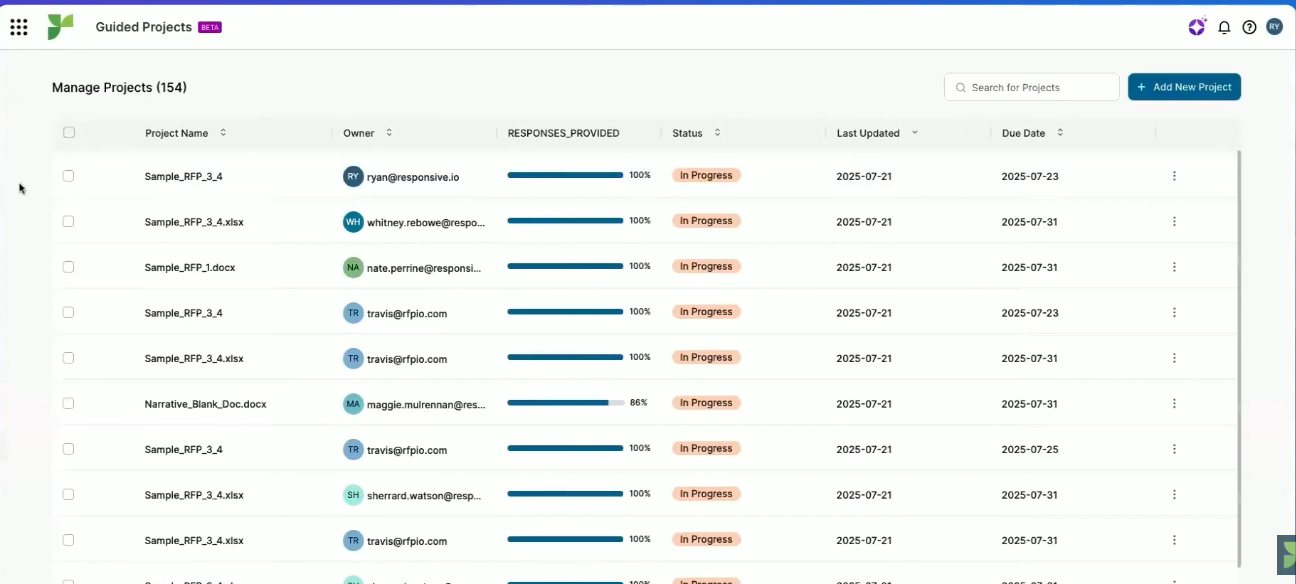
Responsive.io is a strategic response management software. It helps businesses simplify the process of responding to requests for proposals (RFPs). Users upload RFPs, and the software analyzes them, pulls responses from a central library, suggests edits, and tracks collaboration.
Key Features of Responsive.io
Here are some of Responsive.io’s features:
- Content Library: Store and reuse approved responses from past RFPs.
- AI-Powered Suggestions: Auto-generate responses from past content.
- Multi-User Collaboration: Assign questions to subject matter experts, track contributions, and manage approvals.
- Project Management: Organize RFP projects with task assignments, deadlines, and progress tracking.
- TRACE Score™: Measure response quality, accuracy, and compliance.
- Integrations: Connect with CRM, Slack, Teams, and Salesforce to sync data and reduce manual entry.
- Analytics & Reporting: Track performance, win rates, response times, and content usage.
- Templates & Export: Create reusable templates and export in multiple formats (Word, PDF, Excel).
Understanding Responsive.io's Pricing Model
Responsive.io uses a four-tier plus usage-based hybrid pricing model.
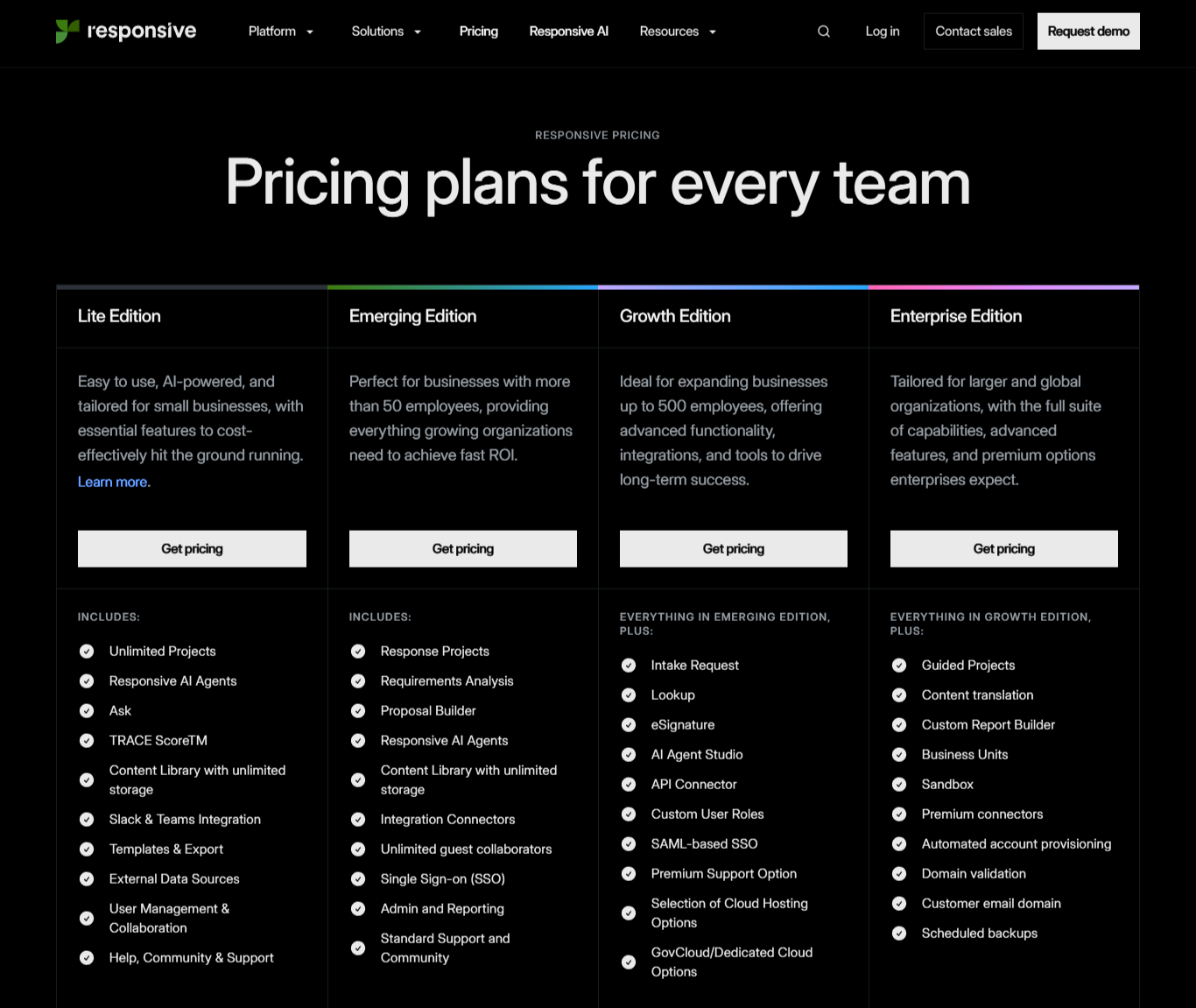
Each tier determines which features you can access, and your usage within said tier determines the actual price.
This model creates two layers of uncertainty that are hard to plan for.
1. Rigid Tier Structure
Say the major thing you need is an interactive proposal builder. From their website, you already know this feature sits within the Emerging edition. However, you’re forced to upgrade to access the ‘eSignature’ feature, in the Growth edition. That means, you pay for the whole tier or go without.
2. Unpredictable Usage Costs
Even after you pick a tier, your actual price depends on variables that grow as you use the platform:
- Usage metrics: Active RFX volume, number of users (authors/contributors/reviewers), storage for large libraries
- Feature add-ons: AI agents, TRACE scoring, auto-fills, custom reports
- Integrations: API access, CRM/Jira syncs, SSO, security automation
- Enterprise services: SLAs, dedicated training, custom implementation
As a result, you can see which tier you need, but you can't predict what that tier will cost. This also means you can’t model ROI or justify spend, because the final number only emerges after negotiation.
However, if you need a ballpark figure of what users are actually paying, aggregated marketplace data from Vendr (a verified B2B procurement marketplace) reports that Responsive.io deals tend to cost around $14,000 per year.
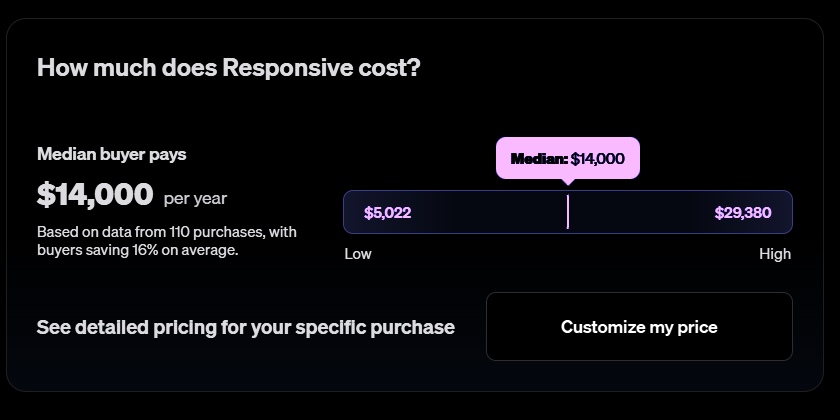
Although for core subscriptions, prices range from $5,000 to $29,000+, depending on team size and negotiation. Enterprise setups with more users and add-ons can cost a lot more.
Responsive.io Pricing: Tier Breakdown
Responsive.io’s pricing has four tiers. Before we break them down, here’s a quick overview of their key features and limitations.
|
# |
Tier |
Best For |
Key Features |
Major Limitations |
|
1 |
Lite |
Small teams just starting with RFPs |
Unlimited projects, AI agents, content library, Slack/Teams integration |
No SSO, no CRM integrations, no admin controls |
|
2 |
Emerging |
Growing teams managing multiple response projects |
Everything in Lite + proposal builder, SSO, admin tools, guest collaborators |
No Salesforce, no custom branding, no API access |
|
3 |
Growth |
Mid-market teams with steady RFP volume |
Everything in Emerging + Saleforce, API, eSignature, custom user roles |
No Business Units, no sandbox, no translation, AI usage billed separately |
|
4 |
Enterprise |
Large enterprises with global operations |
Everything in Growth + translation, Business Units, sandbox, premium support |
Long contracts, expensive implementation, pricing varies wildly |
Lite Edition
Responsive.io’s Lite Edition is built for smaller or lean teams who are just formalizing their RFP process and need somewhere to store answers, collaborate, and send out responses.
You get the basics: unlimited projects, a content library to reuse past answers, AI suggestions, and integrations with Slack and Teams. However, you won’t get the deeper controls, reporting, or governance tools that show up in higher plans.
While this simplicity can be helpful, it’s still quote-based even at this entry level, which makes it harder to predict cost as your needs grow.
Key Features
- Unlimited projects for RFPs, RFIs, and RFXs
- Content library with unlimited storage for Q&A reuse
- Responsive AI agents and ask feature
- TRACE Score™ for response accuracy
- Templates and export (Word, PDF, etc.)
- External data sources
- User management and collaboration
- Slack & Teams Integration
- Help, Community & Support
Emerging Edition
When you need to manage full response projects, not just answer questions, Emerging Edition becomes necessary.
You’ll get more structure, response project management, a proposal builder and some admin tools to keep things organized.
You also get SSO, which is handy if your company cares about security and centralized logins. And unlimited guest collaborators means you can loop in external partners or subject matter experts without paying for extra seats.
The tradeoff is still cost and clarity. You’ll still be unable to estimate pricing or budget till you speak to sales.
Key Features
- Response projects and requirements analysis
- Proposal builder
- Responsive AI agents
- Content library with unlimited storage
- Integration connectors
- Unlimited guest collaborators
- Single Sign-on (SSO)
- Admin controls and basic reporting
- Standard support and community
Growth Edition
Growth Edition is where it starts to feel less like a tool you picked and more like a system you're committing to.
This tier is built for teams handling a steady stream of complex RFPs, RFIs, RFXs, and security questionnaires, teams that aren't just responding anymore, but building entire processes around response management.
Basically, you get more breadth and control in this tier. But that brings its own complexity, and cost is still an uncertainty.
In this tier, you get everything in Emerging Edition, plus:
Key Features
- Intake request
- Lookup
- eSignature
- AI agent studio
- API connector
- Premium connectors (limited)
- Custom user roles
- SAML-based SSO
- Premium support option
- Selection of cloud hosting options
- Govcloud/dedicated cloud options
Enterprise Edition
The Enterprise Edition is built for teams handling hundreds or thousands of RFPs and questionnaires each year, often across multiple regions or business units. At that scale, lighter tools simply won’t cut it.
You get features like sandbox environments, content translation, custom reporting, and premium support with SLAs.
But again, at this point, the tradeoffs are long implementations, long-term contracts, and custom pricing often bundled with professional services.
If you're not managing hundreds of complex proposals annually, this tier is probably more (and costs more) than you need.
For this tier, you get everything in Growth, plus:
Key Features
- Guided projects for self-service response workflows
- Content translation for multi-language support
- Custom report builder
- Business units for segmented operations
- Sandbox environments
- Premium connectors (unlimited)
- Automated account provisioning.
- Domain validation
- Customer email domain customization.
- Scheduled backups.
- Full SAML-based SSO, custom user roles
- Premium Support and SLAs.
Pros of Responsive.io Pricing
Despite their downsides, Responsive.io still has some advantages listed below.
1. It Can Make Sense at Very High Volume
If your team is handling hundreds or thousands of RFPs a year, Responsive.io’s pricing can work in your favor. At that scale, some teams are able to negotiate lower per-response costs, especially when volume is predictable and usage is tightly managed.
2. Flexibility for Complex, Enterprise Needs
Large teams with unique workflows can benefit from Responsive.io's custom pricing. If you need tailored configurations, specialized integrations, or region-specific setups, negotiating a custom contract gives you room to shape the platform around your needs.
This flexibility matters most when complexity is your main challenge, not speed or simplicity.
Hidden Costs and Limitations of Responsive.io Pricing
1. Pricing Depends on How Well You Negotiate
With Responsive.io, two similar teams can end up paying very different amounts, based on negotiations.
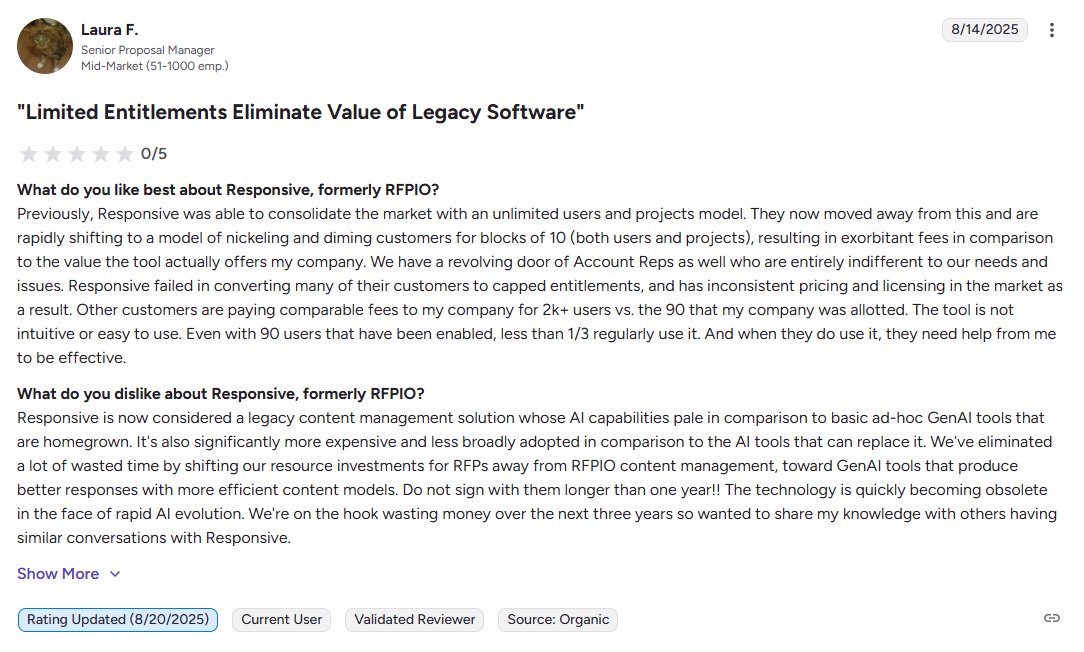
Which means, if you don’t have procurement expertise, you’re starting at a disadvantage. One G2 reviewer says they paid the same amount for 90 users that other companies paid for 2,000+ users.
2. Key Features Often Cost Extra
On paper, each Responsive.io tier looks well-equipped. In reality, teams discover that capabilities they assumed were included, require additional fees.
Another G2 reviewer puts it bluntly:
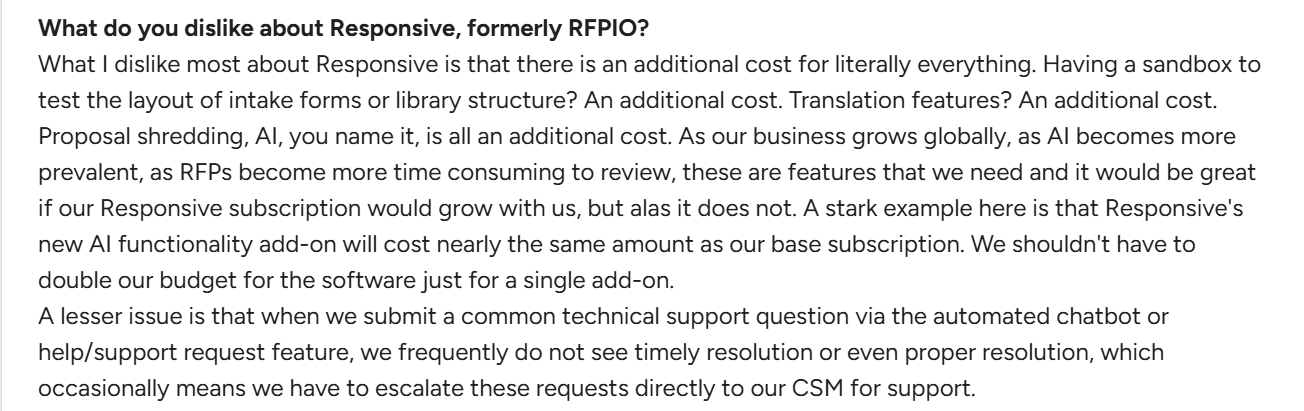
The same reviewer also notes that Responsive.io’s newer AI add-on was priced nearly the same as their base subscription, effectively doubling their budget just to access a single feature.
3. Hard to Budget, Harder to Justify
Because pricing isn't published or predictable, planning becomes difficult. Finance can't forecast costs accurately, and sales leaders struggle to justify budget increases without concrete numbers. So, teams hesitate. They delay adding users, hold back on expanding usage, or stay smaller than they should.
4. Extra Time Cost for Lean Teams
Evaluating Responsiveio’s pricing isn’t a quick checkbox exercise. It usually involves multiple calls, negotiations, and internal approvals.
For lean teams, that time adds up. Every hour spent navigating pricing discussions is an hour not spent responding to clients or creating proposals. Smaller teams tend to feel that tradeoff the most.
Proposify: A Better Alternative to Responsive.io for Proposal Teams
Proposify is purpose-built to help teams create visually impressive, on-brand proposals and other client-facing documents without all the complexity.
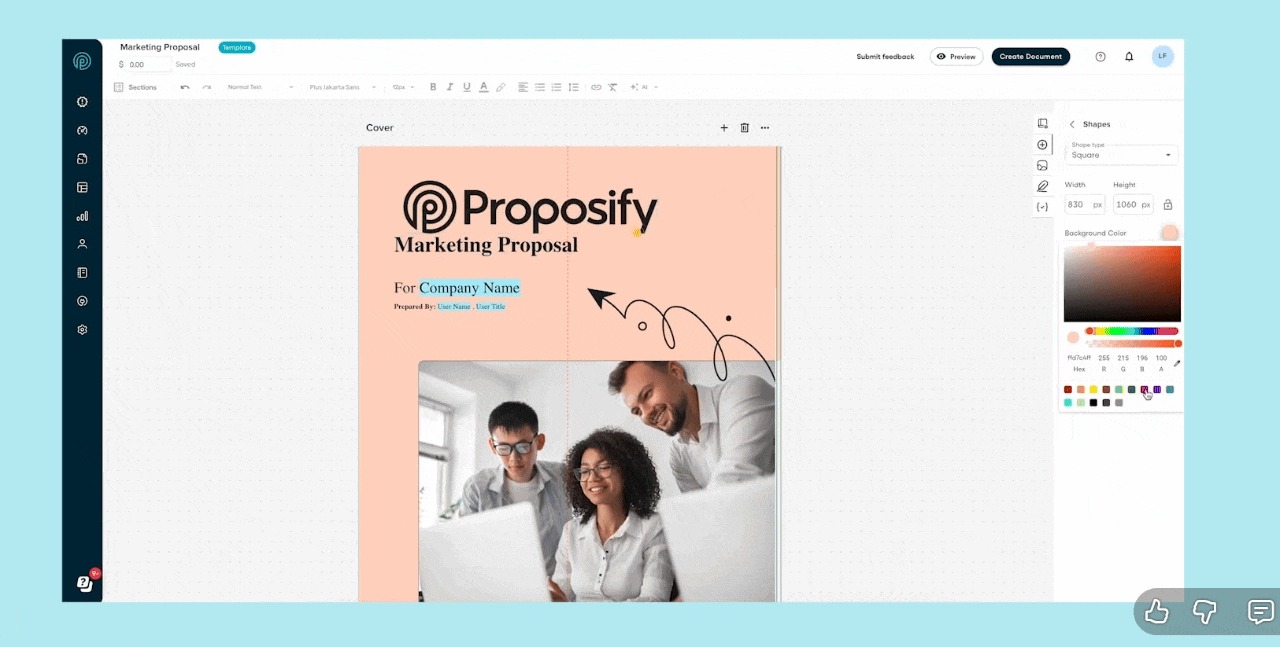
As Brian Fairchild, a Proposify customer, puts it:
“I didn't want to hand my team something complex. Proposify allowed us to quickly make a proposal look polished and professional, but without all the fuss. It’s a powerful tool, but it’s also intuitive and user-friendly, which is key for our field teams who need to create proposals quickly.”
Plus, we publish our pricing. The plans are clear, and you know exactly what you’re paying for before booking a call or committing to a contract.
Proposify Key Features
- Content Library: Store and reuse content like pricing tables, terms, and images for consistent proposal creation.
- Workflow Automation: Set up approval processes once, then let them run on autopilot.
- Interactive Quotes: Allow prospects to adjust pricing and select options in real-time for a dynamic quoting experience.
- Role-Based Permissions: Lock down specific elements so only the right people can edit them.
- Interactive Proposal Builder: Drag-and-drop editing that lets you create polished, on-brand proposals without design experience.
- Industry-Specific Templates: Start with templates built for your industry instead of generic layouts that need heavy customization.
- AI Template Generator: Let AI build proposal templates tailored to your specific use case so you don’t start from scratch.
- Proposal Analytics: See exactly how prospects engage with your proposals, including who's reading, when they opened it, and how long they spent on each section.
- E-Signature Integration: Let clients sign right inside the proposal without awkward email chains or third-party tools.
- CRM Integrations: Plug into the sales tools like Salesforce, HubSpot, Pipedrive, and more.
Proposify Pricing Plans
Unlike Responsive.io, Proposify uses a simple tiered pricing model without the added complications of usage-based pricing. What you see is what you get. Features like API access, e-signatures, and CRM integrations are included in your plan, not sold as expensive add-ons.
We have three pricing plans:
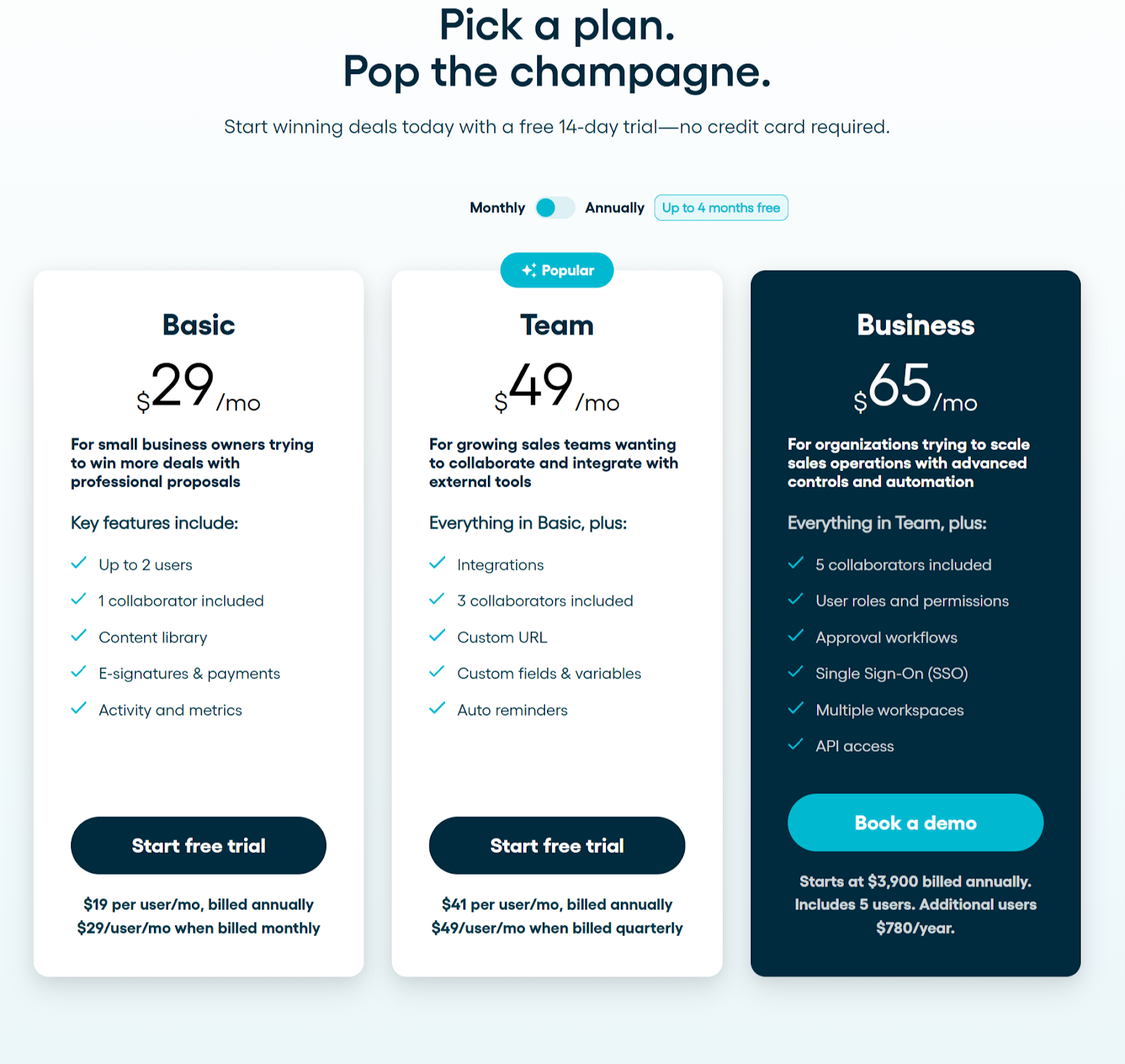
Basic Plan ($19/user/month, billed annually) or $29/user/month, billed monthly)
The Basic plan is ideal for teams just getting started. It includes core tools for creating polished proposals without unnecessary complexity.
What you get:
Content Authoring and Brand Customization:
- Content library and unlimited templates
- Embed images & videos
- Interactive quoting & online signatures
- 5 document sends per month
- 1 collaborator seat included
Visibility, Process and Control:
- Notifications & metrics
- PDF export
Integrations, API and Customer Success:
- Payments
- Email & chat support
Team Plan ($41/user/month, billed annually) or $49/user/month, billed quarterly)
The Team plan works for growing teams collaborating across sales reps, managers, or subject matter experts. It adds structure, visibility, and better coordination while keeping the experience simple.
What you get:
Content Authoring and Brand Customization:
- Content library and unlimited templates
- Embed images & videos
- Custom domain
- Interactive quoting & online signatures
- Client input forms
- Unlimited document sends
- 3 collaborator seats included
Visibility, Process and Control:
- Notifications & metrics
- Reports
- PDF export
- Custom fields & variables
- Auto reminders
Integrations, API, and Customer Success:
- Payments
- CRM integrations
- Automations
- Email & chat support
Business Plan ($65/user/month (annual starts at $3,900, 5 users)
The Business plan suits high-volume teams needing stronger reporting, advanced integrations, and more oversight while keeping proposal creation simple.
What you get:
Content Authoring and Brand Customization:
- Content library and unlimited templates
- Embed images & videos
- Custom domain
- Interactive quoting & online signatures
- Client input forms
- Unlimited document sends
- 5 collaborator seats included
Visibility, Process and Control:
- Notifications & metrics
- Reports
- PDF export
- Custom fields & variables
- Auto reminders
- Roles & permissions
- Approval workflows
- Workspaces
- API access
Integrations, API, and Customer Success:
- Payments
- CRM integrations
- Automations
- Single sign-on (SSO)
- Email & chat support
- Phone & Zoom support
- Success manager
- Premium integration support
Pricing Comparison: Responsive.io vs Proposify
Here’s a summary table of Responsive.io and Proposify pricing. This will help you quickly see where each platform is strongest.
|
# |
Decision Factor |
Proposify |
Responsive.io |
Why it matters |
|
1 |
Primary use case |
Sales proposals and client-facing documents |
RFPs, RFIs, security questionnaires, due diligence |
Different tools are built for different jobs |
|
2 |
Product philosophy |
Purpose-built and focused |
Broad response management platform |
Focus impacts complexity, cost, and time to value |
|
3 |
Pricing model |
Public, tiered |
Tiered, quote-based pricing |
Predictable costs vs negotiated spend |
|
4 |
Pricing transparency |
Fully visible upfront |
Requires sales conversation |
Buyers can self-qualify and budget faster |
|
5 |
Contract flexibility |
Monthly or annual plans |
Typically annual contracts |
Easier to adjust or exit if needs change |
|
6 |
Free trial |
Yes |
No public trial |
Lower risk to evaluate before committing |
|
7 |
Ease of adoption |
Quick setup, minimal training |
Requires onboarding and configuration |
Faster time to value vs longer rollout |
|
8 |
Proposal design & branding |
Visual, drag-and-drop, brand-forward |
Structured, text-first response builder |
Impacts how polished proposals look to clients |
|
9 |
Sales engagement insight |
Tracks views and engagement |
Focuses on internal response workflows |
Helps sales teams follow up with context |
|
10 |
Feature scope & focus |
Lean feature set aligned to proposals |
Extensive enterprise feature set |
Paying for what you use vs paying for breadth |
|
11 |
Ideal team profile |
SMBs, agencies, sales-led teams |
Mid-market to enterprise response teams |
Better fit reduces overhead and friction |
Why Proposify Works Better for You
- You Get Clear, Predictable Pricing: Transparent plans shared upfront, making budgeting easier. Support available if need any help.
- It’s Built Specifically for Proposals: You’re not paying for enterprise governance features you don’t use. Proposify stays focused on proposals and client-facing documents. That’s more value per feature and less overhead.
- Faster Path from Idea to Polished Proposal: Drag-and-drop editing, reusable content, and built-in approvals mean less setup and quicker turnaround.
- Easy to Roll Out, Easy to Scale: You can start small, add users as needed, and adjust plans without getting locked into long-term contracts.
- Get Extra Collaboratorntributor Seats Without Forcing Upgrade: Each Proposify plan includes a certain number of free collaborators access, so you can loop people in without bumping your entire plan and if you need more you can buy them at $8/seat/month..
Send Polished Proposals Without Enterprise Complexity and Overhead
If your goal is to create professional proposals and close deals faster, Proposify is built for exactly that. No price negotiations. No lengthy implementations. No enterprise bloat. Just straightforward proposal software that helps you win more business.
Book a demo or Try Proposify free for 14 days. No credit card required.