







Published: March 23, 2023
Updated: October 16, 2026

Quick Summary
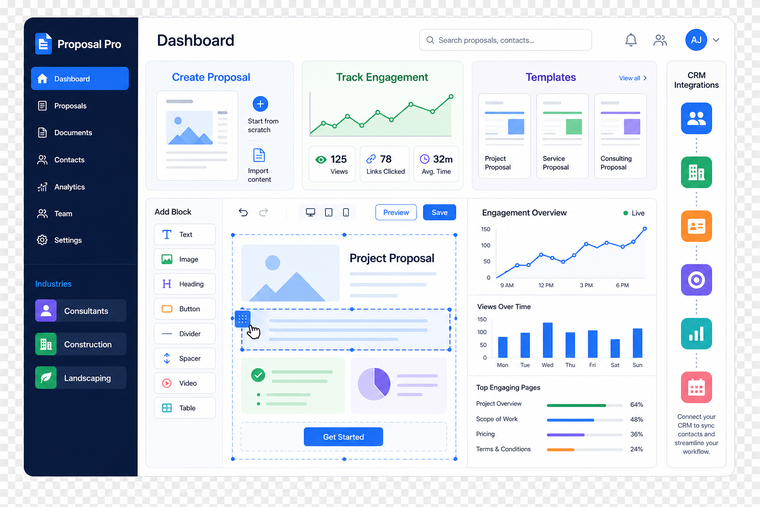
Teams usually look for PandaDoc alternatives when they need more control over how proposals look, work, and scale. Proposify is our top pick for sales teams that want greater design flexibility, structured proposal workflows, detailed engagement analytics, and branded proposal delivery with custom domains. Scoro is a strong fit for all-in-one business management, while Qwilr is ideal for simple, web-based proposals.
Why look for a PandaDoc alternative?
You're looking for proposal software, and you know that PandaDoc is a leading option. But you might be wondering what else is out there and might fit your needs better.
PandaDoc is a simple solution for contract and proposal templates. But because the company targets very small businesses, the platform lacks many of the features that pro sellers are looking for.
If you want to improve your proposal closing rate, you’ll want dynamic pricing, proposal reviews and comments, proposal analytics, and easy negotiation. And if you’re looking to improve your collaboration as a sales team, you’ll want a content library with approved content snippets as well as internal proposal approval.
Why Listen to Us
At Proposify, we build proposal solutions for sales teams. More than 8000 businesses use our platform to create, send, track, and sign proposals more efficiently, giving us firsthand insight into what makes a proposal software effective. We combined that expertise with product research, customer feedback, and hands-on evaluation to compare PandaDoc with the leading alternatives, highlighting where each platform is the strongest fit.
What are the top PandaDoc alternatives?
|
# |
Name |
Key Features |
Pricing |
Rating |
|
1 |
Proposify |
E-signatures, 75+ templates, interactive pricing, proposal analytics, content library, CRM integrations, AI proposal generator |
Build: $35/user/month; Grow: $325/month (5 seats); Scale: approx. $1,066.67/month (10 seats). All billed annually. |
4.6/5 |
|
2 |
Scoro |
Time tracking, project management, proposal creation, budget tracking, business analytics |
Essential: $26/user/month Pro: $63/user/month (5 user minimum) |
4.5/5 |
|
3 |
Qwilr |
Proposal builder, interactive widgets, CRM integrations, payment processing, e-signatures |
Business: $35/user/month Enterprise: $59/user/month |
4.6/5 |
|
4 |
DocuSign |
E-signatures, multiple file formats, electronic notarization, contract lifecycle management |
Personal: $10/month Business: $25/user/month Business Pro: $40/user/month |
4.5/5 |
|
5 |
Nusii |
Proposal templates, email notifications, multimedia support, payment processing |
Freelancer: $29/month (5 active proposals) Agency: $49/month (20 active proposals) |
4.5/5 |
|
6 |
Concord |
Contract builder, approval workflows, e-signatures, contract storage, renewal tracking |
Standard: $17/user/month Pro: $49/user/month |
4.3/5 |
|
7 |
Loopio |
Content library, RFP automation, dynamic templates, project tracking, proposal analytics |
Custom enterprise pricing |
4.7/5 |
|
8 |
Honeybook |
All-in-one platform with proposals, invoices, booking, lead tracking, payment processing |
$39/month or $390/year |
4.5/5 |
|
9 |
Dubsado |
Proposals, contracts, invoices, scheduling, client portals, forms |
Starter: $150/year Premier: $350/year |
4.4/5 |
|
10 |
JotForm Sign |
PDF to contract conversion, e-signatures, website embedding, email notifications |
Free: 5 forms, 10 signed forms/month Silver: Up to $39/month (50 forms, 250 signed forms) |
N/A |
|
11 |
DealHub |
DealRoom portals, proposals, e-signatures, contract automation, renewal tracking |
Custom pricing |
4.7/5 |
|
12 |
GetAccept |
Proposals, e-signatures, digital sales rooms, personalized videos, live chat |
Free: 3 documents/month Professional: $49/user/month |
4.7/5 |
|
13 |
Responsive (formerly RFPIO) |
RFP response automation, proposal sending, e-signatures, knowledge management |
Custom pricing |
4.5/5 |
|
14 |
DocSend |
Document sharing, e-signatures, secure client portals, document analytics |
Personal: $10/user/month Standard: $45/user/month |
4.6/5 |
|
15 |
Oneflow |
Digital contracts, contract comments, audit trail, templates, lifecycle calendar |
Essentials: $17/user/month Business: $45/user/month |
4.4/5 |
Check out the best PandaDoc competitors listed in more detail below, from all-in-one small business tools to platforms designed for professional sales teams.
1. Proposify
With Proposify, sales teams can say goodbye to messy, inconsistent proposal processes. Proposify helps teams gain control and visibility at every step, from on-brand proposal creation to prospect activity tracking and content optimization. The software is popular amongst franchises, B2B SaaS, marketing agencies, consultants, construction companies, and other service-based businesses.
Features
- E-signatures
- 75+ proposal templates, quote templates, and contract templates
- Custom fields
- Proposal design editor
- Internal proposal review and approvals
- Proposal comments for clear negotiation
- Interactive pricing tables
- Web-based proposals with no attachments required
- Content library with re-usable snippets
- Proposal viewing and closing analytics
- Email templates
- Notifications
- Automated email reminders
- Integrations with HubSpot, Gong, Salesforce, and more
- Payment processing
Pricing
Proposify’s Build plan costs $35 per user per month when billed annually, or $49 per user per month when billed quarterly. It includes a content library, document analytics, and integrations. Grow costs $325 per month for five seats, billed annually at $3,900, and adds approval workflows, user permissions, and API access.
Scale works out to $1,066 per month for 10 seats, billed annually at $12,800, adding SSO, multiple workspaces, and premium onboarding.
Additional seats on Grow and Scale cost $65 per seat per month, billed annually.
Proposify offers a 14-day free trial with no credit card required. Check the current pricing page for plan details and any integration add-on costs.
Pros and cons
Proposify is one of the top proposal tools available. It’s perfect for sales teams that want to create compelling, on-brand proposals and improve control and visibility throughout the entire proposal process. However, it might be too robust for solo firms and very small businesses.
Best for
Sales teams that need structured proposal workflows, analytics, and strong collaboration controls.
Reviews
Proposify has a 4.6/5 star rating on G2 based on 1,122 reviews.
2. Scoro
Scoro is a comprehensive platform for managing all sorts of collaboration. It includes proposal creation and signing features alongside project management and time tracking.
Features
- Time tracking
- Gantt charts for project management
- Proposal and quote creation
- Purchase order tracking
- Team budget tracking
- Business analytics
Pricing
The Essential Plan costs $26 per user and the Pro Plan, which unlocks all core features, costs $63 per user per month. All plans require a minimum of 5 users.
Scoro offers a fully featured 14-day free trial that allows teams to explore its proposal and project management tools.
Pros and cons
Most companies looking for proposal software already have project management and financial management solutions in place, making Scoro unnecessarily complex. If you’re launching a brand new small business, you might benefit from starting with Scoro. But as your company grows, Scoro’s jack-of-all-trades approach might mean it doesn’t have the best-in-class features each team needs.
Best for
Companies that want proposal tools combined with project management and business operations in one platform.
Reviews
Scoro has a 4.5/5 star rating on G2 with 412 reviews.
3. Qwilr
Qwilr is a simple proposal software with affordable plans. In addition to web-based proposals that don’t require document uploads and downloads, you also get e-signatures and payment collection.
Features
- Proposal builder
- Interactive widgets
- CRM integrations
- Payment processing
- E-signatures
Pricing
You’ll pay $35 per user per month on the Business Plan, and $59 per user per month on the Enterprise Plan, which offers advanced customization.
Qwilr offers a 14-day free trial so users can create and send interactive proposals before selecting a plan.
Pros and cons
While Qwilr does offer an attractive proposal builder, it doesn’t include email templates and automation, so it might not be a fit for most sales teams.
Best for
Teams that want simple, web-based proposals with interactive content and payments.
Reviews
Qwilr has a 4.6/5 star rating on G2 with 801 reviews.
4. DocuSign
DocuSign is a popular platform for signing all sorts of contracts. You’ll need to create your contracts in Microsoft Word, PowerPoint, or another platform, but then you can upload them as reusable templates.
Features
- E-signatures
- Accepts PDF, DOCX, RTF, TXT, and PNG
- Electronic notarization
- Contract lifecycle management
- Integrations with Salesforce and other CRMs
Pricing
The Personal Plan costs $10 per month, the Business Plan costs $25 per user per month, and the Business Pro Plan costs $40 per user per month. Most businesses will need their middle-tier plan.
DocuSign offers a free 30-day trial of its eSignature platform so users can send documents for signature.
Pros and cons
DocuSign is great if you want to collect e-signatures on a variety of documents and use a single platform across all teams. However, it doesn’t offer a proposal builder or templates, meaning you’ll have to hire a graphic designer to help you create your proposal style. Then, your sales team will have to wrangle that platform to customize the proposal content for each client.
Best for
Businesses focused primarily on collecting legally binding e-signatures across many document types.
Reviews
DocuSign has a 4.5/5 star rating on G2 based on 2,469 reviews.
5. Nusii
Nusii is an online proposal tool that makes it easy to create beautiful proposals and send them for e-signature. You can also add editable pricing tables and collect payments from clients.
Features
- Proposal templates
- Email notifications and reminders
- Support for multimedia content
- Payment processing
- Integrations with CRMs
Pricing
The Freelancer Plan costs $29 per month and allows you to have up to 5 active proposals. The Agency Plan costs $49 per month and allows you to have up to 20 active proposals.
Nusii offers a 14-day free trial so users can create and manage proposals before choosing a subscription.
Pros and cons
Nusii’s pricing is based on the number of active proposals instead of the number of active users, making it a good fit for small businesses that don’t pitch and sign new clients frequently. However, if you have a higher-volume business model, you’ll do better with a proposal platform with unlimited access. What’s more Nusii lacks the analytics features that will help you track client activity and proposal success.
Best for
Small agencies and freelancers who want a lightweight proposal tool with simple pricing.
Reviews
Nusii has a 4.5/5 star rating on G2 based on 24 reviews.
6. Concord
Concord is a contract lifecycle management platform that multiple teams can use, including sales, legal, procurement, and HR.
Features
- Contract builder
- Internal contract approval workflows
- E-signatures
- Contract storage
- Renewal deadline tracking
Pricing
You’ll pay $17 per user per month on the Standard Plan and $49 per user per month on the Pro Plan, which unlocks access to the Salesforce integration as well as approval workflows and customized reports.
Concord offers a free 14-day trial that allows users to test contract workflows without entering payment information.
Pros and cons
With its contract builder and tracking capabilities, Concord is a great PandaDoc alternative for teams that don’t want to struggle with Microsoft Word. However, it doesn’t offer a proposal builder or templates, so consider Proposify or Nusii if you’re looking to streamline design and proposal customization.
Best for
Teams that need contract lifecycle management with approvals and centralized contract storage.
Reviews
Concord has a 4.3/5 star rating on G2 with 135 reviews.
7. Loopio
With Loopio, you can centralize your responses to RFPs, making it easier to recycle your best content. You can also improve team collaboration and save time on every proposal.
Features
- Content library
- Magic response automation
- Dynamic RFP templates
- Project tracking
- Proposal analytics
- Integrations with CRMs
Pricing
As an enterprise-only solution, Loopio doesn’t publish their pricing online, so you’ll need to get in touch with them for a custom quote.
Loopio does not offer a public free trial.
Pros and cons
The content library and magic response automation make Loopio a good fit for companies that want to speed up their responses to RFIs, RFPs, and security questionnaires. However, if you’re looking for a solution for simpler, unsolicited proposals, Loopio will be too complex and costly for your needs.
Best for
Enterprise teams responding to RFPs and complex questionnaires that require centralized content libraries.
Reviews
Loopio has a 4.7/5 star rating on G2 with 731 reviews.
8. Honeybook
With its all-in-one approach, Honeybook is a good option for freelancers, creatives, and other small businesses looking to consolidate proposal software with the rest of their tech stack.
Features
- Invoices
- Proposal and contract builder
- Appointment and service booking
- Lead tracking
- Project tracking
- Payment processing
- Forms and questionnaires
Pricing
Honeybook offers unlimited access to all features for $39 per month or $390 per year.
HoneyBook offers a 7-day free trial so users can explore its proposal and client management features.
Pros and cons
If you’re running a one-person company, Honeybook offers the proposal features you need alongside other business management tools so you can lower your monthly expenses. But most sales teams will need advanced proposal features like content libraries, email templates, and proposal analytics.
Best for
Freelancers and small service businesses that want proposals, payments, and client management in one platform.
Reviews
Honeybook has a 4.5/5 star rating on G2 with 150 reviews.
9. Dubsado
Dubsado is similar to Honeybook. You’ll get proposal creation, sending, and signing alongside other business management features that work well for solo businesses.
Features
- Proposals
- Embeddable website packages
- Payment processing
- Contracts
- Invoices
- Calendar scheduling
- Forms and questionnaires
- Client portals
Pricing
The Starter Plan costs $150 per year and gives access to many of the features. For the Premier Plan, you’ll pay $350 per year and unlock all features.
Dubsado offers a 21-day free trial that provides full access to the platform’s Premier plan features.
Pros and cons
Dubsado’s Starter Plan is very affordable and does include their proposal features, making it a good fit for a company of one. If you’re looking to streamline proposal creation as a team and improve brand consistency, Dubsado won’t be a fit for you.
Best for
Solo businesses and small teams that want proposals alongside scheduling, forms, and client portals.
Reviews
Dubsado has a 4.4/5 star rating on G2 with 57 reviews.
10. Jotform Sign
Jotform Sign is an e-signature solution offered by form builder Jotform. You can use it to convert PDFs into online documents, collect signatures, and automate manual processes.
Features
- Turn PDFs into contract templates
- E-signatures
- Embed contracts on your website
- Email notifications and sharing links
- Tables for aggregating contract data
Pricing
Jotform’s Silver Plan costs up to $39 per month and lets you have up to 50 forms and 250 signed forms per month. You can also get in touch with them for a custom enterprise plan with unlimited signing.
Jotform Sign offers a free plan with limited usage, which functions as a long-term trial for testing the platform’s features.
Pros and cons
If you have a simple proposal document you send to all prospects with little to no customization, Jotform Sign could work for you. However, if you want to mix and match the right content to create the perfect proposal or write a custom executive summary, choose another PandaDoc alternative on our list.
Best for
Businesses that need simple e-signature workflows built on form-based documents.
Reviews
JotForm Sign's doesn’t have specific ratings, but the main JotForm product has a 4.7/5 star rating with over 3,600 reviews.
11. DealHub
DealHub is a contract management solution designed for B2B SaaS companies. You can use it to track the progress of deals, send and sign contracts, and stay on top of subscription renewals.
Features
- DealRoom (portals for multiple decision makers and docs)
- Proposals and price quotes
- E-signatures
- Automate contracts and renewals
- Track upselling and cross-selling opportunities
- Salesforce and other CRM integrations
Pricing
DealHub doesn’t publish their pricing online, so get in touch with them for a custom quote.
DealHub does not offer a public free trial. Pricing and product access are typically provided through custom demos and quotes.
Pros and cons
With the DealRoom and renewal tracking, DealHub offers a great solution for SaaS sales teams. However, despite all of the niche features, the proposal builder lacks dynamic pricing tables, video embeds, and intake forms. If top-notch proposals matter to you above all else, consider another PandaDoc alternative.
Best for
B2B SaaS sales teams that need deal rooms, quoting workflows, and subscription management.
Reviews
DealHub has a 4.7/5 star rating on G2 with 731 reviews.
12. GetAccept
With GetAccept, you can send proposals and quotes to your prospects, deliver sales enablement materials, and chat with your buyer while they review everything. You can then collect payments with a variety of integrations.
Features
- Proposals and quotes
- E-signatures
- Digital sales rooms for each buyer
- Personalized videos
- Live chat
- CRM and payment integrations
Pricing
On the free service, you can send 3 documents per month. Or, opt for the Professional Plan for $49 per user per month to get unlimited sending and signing.
GetAccept offers a 14-day free trial of its digital sales room and e-signature platform.
Pros and cons
GetAccept is a PandaDoc alternative that is most similar to DealHub. If you want to create sales rooms where you can upload a variety of materials, this might be a good solution for you. But if you don’t want to overwhelm your buyer with a lot of different items and links, then you should consolidate your sales process into a single proposal that supports multimedia files, proposal reviews, and negotiation.
Best for
Sales teams that want digital sales rooms with proposal tracking, video messaging, and live chat.
Reviews
GetAccept has a 4.7/5 star rating on G2 with 1,022 reviews.
13. Responsive (formerly RFPIO)
Responsive is a great option for companies that respond to RFPs, RFIs, RFQs, and security questionnaires. But you can also use it to send unsolicited proposals, or as Responsive calls them, proactive proposals.
Features
- RFP response automation
- Proposal sending
- E-signatures
- Knowledge management
- Security questionnaire response automation
- Integrations with CRM and collaboration tools
Pricing
To get a custom quote, contact their sales team.
Responsive does not offer a self-service free trial.
Pros and cons
Responding to RFPs and security questionnaires requires a lot of manual, repetitive work from high-value employees. Responsive makes it easy to supercharge your productivity. However, they don’t offer many proposal templates or advanced proposal features, making this solution unideal for most sales teams.
Best for
Companies managing RFP responses, security questionnaires, and knowledge-driven proposals.
Reviews
Responsive has a 4.5/5 star rating on G2 with 1,161 reviews.
14. DocSend
DocSend is a secure document-sharing solution that can be used for sales, investor relations, board communication, non-profit fundraising, and pitch deck feedback.
Features
- Document sharing
- E-signatures
- Secure client portals
- Document analytics
- Video analytics
Pricing
The Personal Plan costs $10 per user per month and allows up to 4 signatures per user. The most popular subscription is the Standard Plan, which costs $45 per user per month and unlocks unlimited signing.
DocSend offers a 14-day free trial of its Advanced Data Rooms so users can test document sharing and analytics.
Pros and cons
Like GetAccept, you can use DocSend to create client portals and upload all sales enablement materials, including proposals. However, DocSend is designed for sharing all sorts of documents for all sorts of use cases. It doesn’t offer a proposal builder or template, so you’ll need to use Canva or something similar for customizing proposal docs. That said, DocSend could be a fit if you’re looking for something that will scale across multiple teams, not just sales.
Best for
Teams that want secure document sharing with engagement analytics and client portals.
Reviews
DocSend has a 4.6/5 star rating on G2 with 529 reviews.
15. Oneflow
Oneflow is a digital contract management platform best suited to small businesses. If you’re fine with simple contracts and you don’t need on-brand proposals, this platform might be a fit.
Features
- PDF and digital contracts
- Contract comments
- Audit trail
- Contract templates
- Contract lifecycle calendar
Pricing
You’ll pay $17 per user per month for the Essentials Plan, which gives you access to the contract templates and e-signatures. On the Business Plan for $45 per user per month, you’ll also get their data retention and lifecycle features, but you’ll need to pay extra for the Salesforce integration.
Oneflow offers a 14-day free trial that allows users to test all contract creation and signing features.
Pros and cons
OneFlow offers a lot in the way of the post-sign experience. You can use data fields, tags, integrations, and retention policies to automate client onboarding and internal tasks. It also offers contract lifecycle management features at an affordable cost. However, the lack of a content library means you won’t be able to create and store different snippets. For that reason, this is only a fit if your proposal templates remain very static. The contracts also look like contracts as opposed to beautifully designed proposals.
Best for
Small and mid-size teams that want digital contract workflows with negotiation and lifecycle tracking.
Reviews
Oneflow has a 4.4/5 star rating on G2 with 369 reviews.
How We Evaluated PandaDoc Alternatives
We evaluated PandaDoc alternatives based on the factors below to understand how well each platform supports proposal creation, sales collaboration, and deal execution.
1. Team size and scalability: We evaluated how well each platform supports solo users, growing sales teams, and larger organizations that need standardized proposal workflows.
2. Visibility and collaboration: We assessed whether each tool provides role permissions, content libraries, and activity visibility so teams can collaborate while keeping proposals consistent and on brand.
3. Proposal experience: We looked for features that improve the buyer experience, including interactive pricing, multimedia content, e-signatures, and payment processing.
4. Tech stack fit: Many PandaDoc alternatives overlap with CRM, document management, or client portal tools, so we considered how well each platform fits into a broader sales stack.
5. Integrations: We reviewed whether each solution connects with common CRMs, payment processors, and sales tools so teams can maintain a single source of truth for deal data.
Why Proposify Is a Better Alternative to PandaDoc
Proposify and PandaDoc both help sales teams create, send, and sign proposals, but they focus on different priorities. PandaDoc is primarily a document automation platform used for contracts, forms, and other business documents.
Proposify is built specifically for proposal-driven sales teams. Instead of treating proposals like documents, it gives teams the freedom to create polished, highly customized proposal experiences while keeping approvals, collaboration, and engagement tracking in one place.
The table below highlights the key differences between PandaDoc and Proposify across proposal features and design and workflow capabilities.
|
# |
Feature |
PandaDoc |
Proposify |
|
1 |
Templates |
Large library of functional industry-specific proposal, contract, and quote templates |
Sales-first industry-specific templates with strong brand and creative controls |
|
2 |
Proposal analytics |
Document tracking and real-time notifications |
Engagement tracking with views, time spent, and actions across sections |
|
3 |
Design flexibility |
Structured document editor with predefined layouts |
Presentation-style, drag-and-drop editor with flexible layouts and branding |
|
4 |
Platform focus |
Document automation platform for contracts, proposals, and quotes |
Proposal workflow software for sales teams |
|
5 |
Customer support |
24/7 email and chat support on paid plans |
Email and phone support on entry plans, with dedicated onboarding guidance and support on Business plan |
|
6 |
Feature scope |
Document creation, e-signatures, automation, and integrations |
Proposal creation, approvals, analytics, CRM integrations |
How Sales Teams Scale With Proposify
Proposify is built to help you close more deals, protect revenue, and scale without chaos. Here’s how its core offerings translate into real business outcomes.
1. Deep Proposal Analytics
With Proposify’s real-time engagement analytics, you can see exactly when a prospect opens your proposal, how long they spend on it, and which sections they focus on.
Your follow-ups become timely and specific instead of generic nudges. Sales reps can call when engagement spikes, clarify objections tied to pricing or scope sections, and prioritize deals that are actively being reviewed.
2. Approvals That Eliminate Costly Mistakes
As teams grow, so do risks like pricing errors, outdated terms, unauthorized discounting, and brand inconsistencies. Proposify’s workflow automation and granular, role-based permissions allow you to:
- Lock pricing tables and key terms by role
- Route proposals through structured approval workflows
- Prevent unauthorized edits to critical sections
No more million-dollar mistakes or rogue discounts. Sales gets the flexibility to move fast, while leadership gets the control to protect margins and brand integrity.
3. Scalability Without Losing Control
What works for a 3-person team breaks at 15 reps across multiple locations. Proposify is designed for scaling B2B sales teams, offering:
- Standardized, reusable templates
- CRM integrations to connect proposals to your sales stack
- Role-based permissions for distributed teams
- A set number of free collaborator seats on each plan for occasional contributors (with additional seats available as needed)
Every rep sends consistent, on-brand proposals, whether they’re in the same office or across different regions. You can add reps, offices, or new service lines without reinventing your proposal process.
4. Done-for-You Onboarding
Proposify offers done-for-you implementation and onboarding support, including custom template design and hands-on setup. You don’t spend months rebuilding templates or forcing adoption. Instead, you launch with:
- Professionally designed, on-brand templates
- Structured workflows tailored to your sales process
- A system built around how your team actually sells
That means faster time to value, smoother adoption, and less resistance from reps who just want to close deals.
Best PandaDoc Alternative for Sales Teams
The right PandaDoc alternative depends on how your team creates and manages proposals. Some tools focus on document automation, while others prioritize sales workflows. If your team needs stronger proposal control, collaboration, and engagement insights, Proposify offers a focused platform built specifically for proposal-driven sales teams.
Start winning more deals with real-time engagement tracking. Book a demo to see how Proposify works or sign up for a free trial (no credit card required) to get started right away.
Frequently Asked Questions
1. What Is the Difference Between PandaDoc and Proposify?
The biggest difference is what each platform is designed to optimize. PandaDoc is built to automate a wide range of business documents, while Proposify is purpose-built for creating high-impact sales proposals. It gives teams greater creative freedom to design proposals, along with structured approvals, buyer engagement analytics, and collaboration features that support the entire sales process.
2. Does Proposify Offer Templates for Proposals and Quotes?
Yes. Proposify includes more than 75 proposal, quote, and contract templates that sales teams can customize for different industries and services. These templates help maintain consistent branding and speed up proposal creation across teams.
3. What PandaDoc Alternatives Integrate With CRM Systems?
Several PandaDoc alternatives integrate with popular CRM platforms. Tools such as Proposify, Qwilr, GetAccept, and DealHub connect with systems like Salesforce and HubSpot, allowing sales teams to sync contact data, track proposal activity in their pipeline, and manage deals without switching between tools.
4. Can You Use PandaDoc for Free?
Yes. PandaDoc offers a free plan that allows users to create documents and collect unlimited e-signatures, although advanced features like templates, analytics, and workflow automation are available only in paid plans.
5. Which PandaDoc Alternatives Support E-Signatures?
Many PandaDoc alternatives support built-in e-signatures, including Proposify, Qwilr, DocuSign, GetAccept, and Oneflow. These tools allow prospects to review proposals and sign documents digitally, helping sales teams move from proposal to agreement without switching between multiple platforms.