








Published: December 18, 2025
Updated: December 18, 2025


Quick Summary
Tired of struggling with generic accounting solutions? Check out these options. In this article, we'll highlight seven leading proposal software for accountants, each offering unique features to improve how you create, send, and manage proposals. From seamless integrations to customizable templates, these tools can help streamline your process and close deals faster.
Looking for the Right Tool to Speed Up Your Proposal Process?
If you’re still waiting days for signatures or chasing prospects through endless email threads, chances are you’re losing them to faster competitors. The right proposal software fixes that. It automates your process, helping you create polished proposals in minutes and collect signatures without the back-and-forth.
The proof is in the data: Companies using proposal software close at 36%, compared to the usual 20%.
But here's where many firms get stuck: most tools lack key accounting integrations or charge enterprise-level prices for basic features.
In this Proposify article, we’ve rounded up the top 7 proposal software options built for accounting firms. Each tool optimizes your workflow and helps you finalize deals quickly.
Why Listen to Us?
At Proposify, we've helped accounting firms like Abdo and YHB streamline their proposal processes and improve close rates. With our deep industry experience, we're equipped to guide you through the best proposal software to enhance efficiency and help you win more business.
What Is Proposal Software?
Proposal software is a tool that helps you create, send, and manage proposals with ease. It lets you quickly put together professional documents using templates and preset pricing, so you can customize each proposal for your clients without starting from scratch every time.
For accounting firms, this matters beyond just efficiency. The right proposal software helps you create polished, on-brand documents that position your firm as strategic advisors rather than commodity number crunchers. When prospects can't differentiate, they default to price. Professional proposals that showcase your expertise and approach give you an edge over competitors.
These tools often come with features like e-signatures, document tracking, and analytics to help you manage your proposals more effectively. They also streamline collaboration when multiple people are involved. Since marketing teams often coordinate with firm members on proposals, having everyone work from a centralized platform with consistent branding and approved content prevents version control issues and keeps the process moving.
Why Is Proposal Software Important?
- Saves Time: Streamlines the proposal creation process with templates and preset pricing.
- Improves Accuracy: Reduces human error and ensures consistency across all proposals.
- Professional Branding: Creates polished, on-brand documents that position your firm as experts and differentiate you from competitors.
- Streamlines Collaboration: Centralizes the proposal process when marketing teams and firm members work together, preventing version control issues.
- Customizable: Easily tailor proposals to meet specific client needs and preferences.
- E-Signatures: Allows clients to sign proposals digitally for faster approval.
- Tracking and Analytics: Monitor the status of proposals and gather insights on performance.
7 Top Proposal Software to Consider
Here’s a quick comparison of the tools.
| Tool | Templates & Reusability | Customization | Analytics | Integrations | Mobile Accessibility |
| Proposify | Extensive, industry-specific, reusable templates. | Fully customizable drag-and-drop editor with extensive branding options | Real-time engagement tracking. | Major CRMs (HubSpot, Salesforce, Zoho), payment processors. | Fully mobile-optimized. |
| GoProposal | Accounting-focused, reusable pricing. | Custom pricing, service bundling. | Basic tracking and analytics. | Xero, QuickBooks. | Mobile-responsive. |
| PandaDoc | Extensive templates with content blocks. | Customizable editor with branding options. | Tracks views and interactions. | CRMs, payment systems. | Mobile-compatible. |
| Qwilr | Interactive, reusable content blocks. | Highly customizable with rich media. | Proposal tracking, engagement metrics. | CRMs, project tools. | Mobile-optimized. |
| Better Proposals | Library of templates and reusable content. | Customizable templates and branding. | Basic proposal tracking. | Integrates with payment systems, limited CRM. | Mobile-friendly. |
| Ignition | Industry templates with service bundling. | Customizable contracts. | Basic proposal tracking. | Xero, QuickBooks, Stripe. | Mobile-responsive. |
| Cone | Pre-made templates with reusable blocks. | Customizable templates, simple branding. | Basic tracking, limited analytics. | Accounting tools, Stripe. | Mobile-optimized. |
1. Proposify
Proposify is cloud-based proposal software that makes creating, managing, and tracking proposals simpler.
Our platform combines customizable templates, interactive pricing tables, and built-in e-signatures so you can close deals quickly without the administrative headaches.
For accountants, Proposify cuts through proposal bottlenecks that slow down the process. Build sharp, branded proposals in minutes, see exactly how clients engage, and connect with major CRMs like HubSpot and Salesforce to keep your sales pipeline moving without manual data entry.

Key Features
- Drag-and-Drop Editor: Easily build branded proposals using customizable templates and content blocks.
- Content Library (Snippets): Manage a centralized repository of approved, reusable content and build proposals quickly and consistently.
- Interactive Pricing Tables: Allow clients to toggle options, add-ons, and tiers to see the total price update in real-time.
- E-Signatures: Collect legally binding signatures directly within the proposal document, and close deals instantly without messy print-sign-scan steps.
- Proposal Analytics & Tracking: Receive real-time notifications that show you exactly when a client opens your proposal and how long they spend on each section.
- CRM Integrations: Sync with tools like HubSpot, Salesforce, and Zapier to automate data population and streamline your workflow.
- Automated Workflows: Set up triggers for reminders, approvals, and document updates for smoother collaboration and timely follow-ups.
Pricing
We offer three pricing plans:
- Basic: $19/user/month (annually) or $29/user/month (monthly). Includes e-signatures, payments, document tracking, and more.
- Team: $41/user/month (annually) or $49/user/month (quarterly). Adds unlimited document sends, CRM integrations, custom branding, and more.
- Business: $65/user/month (annually). Includes advanced features like approval workflows, user roles, API access, and more.
All plans come with a 14-day free trial.
Pros
- Comprehensive proposal software with CRM integration and e-signatures.
- Granular analytics for monitoring client engagement time per page.
- Reusable content library for quick, pre-approved drag-and-drop assembly.
- Fills in proposal details automatically using custom fields like client name or pricing.
Cons
- Setup may take time, but a done-for-you option is available.
2. GoProposal
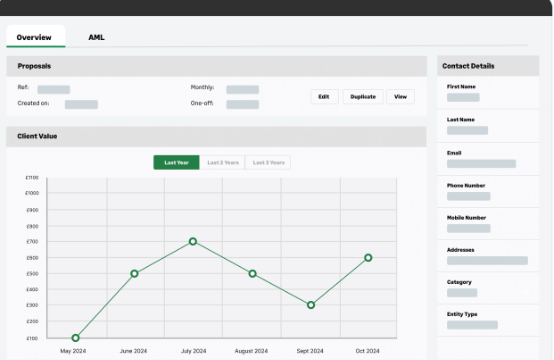
GoProposal is a proposal and pricing tool for accountants and bookkeepers. The software quickly creates professional proposals and engagement letters. It also automates pricing, reduces scope creep, and integrates with Xero and QuickBooks to simplify onboarding and improve operations.
Key Features
- The Pricing Wizard: Use a sophisticated, built-in system to calculate prices for services, ensuring you charge profitably and consistently.
- Automated Engagement Letters (Oversuite): Instantly generate a fully compliant and up-to-date Letter of Engagement (LoE) for the exact services selected.
- Instant Digital Sign-Off: Get your client's digital signature on both the proposal and the LoE on the spot for a friction-free onboarding experience.
- Service Schedules and Key Dates: Clearly define and schedule recurring tasks for each service and minimize the risk of missed deadlines.
- Branded Proposal Templates: Produce professional, on-brand proposals and renewals instantly with custom text, images, and testimonials.
Pricing
GoProposal offers four pricing plans:
- Solo: $75/month (1 user, 5 proposals/month). Includes customizable templates, an automated pricing wizard, engagement letter generation, and integrations with Xero and QuickBooks.
- Basic: $120/month (1 user, 10 proposals/month). Includes all Solo features, plus automated engagement letters (OverSuite), service scheduling, client reminders, and more.
- Standard: $150/month (2 users, 50 proposals/month). Includes all Basic features, plus additional users, service catalog, advanced customization options, and reporting.
- Premium: $255/month (10 users, unlimited proposals). Includes all Standard features, plus multi-user collaboration, multiple service bundles, priority support, and detailed analytics.
Pros
- Intelligent Pricing Wizard guides consistent value-based fee calculation.
- Automates service schedules for clear client delivery expectations.
- Industry software custom-built and pre-loaded with accounting templates.
Cons
- Often requires expensive add-ons for essential compliant engagement letters.
- Lacks native integrations with major payment processors like Stripe.
3. PandaDoc
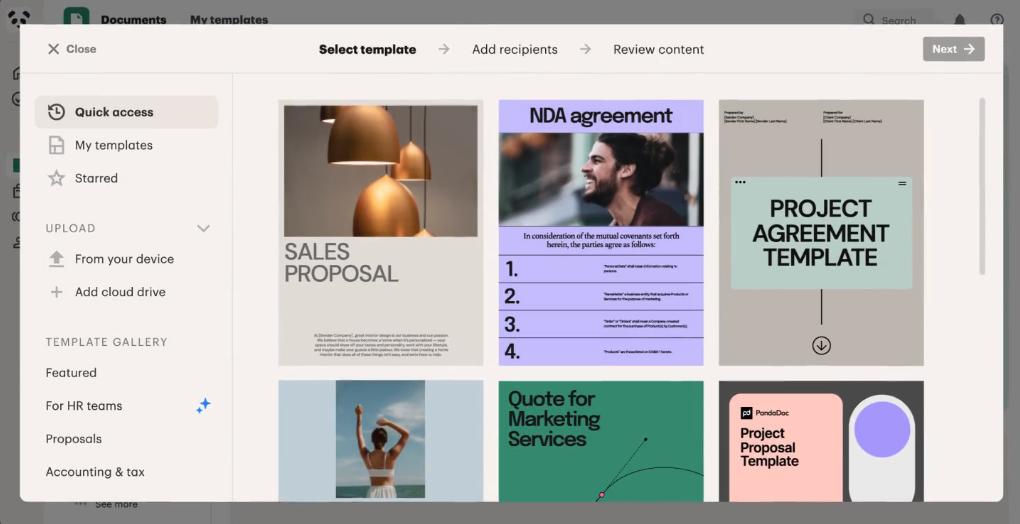
PandaDoc is an all-in-one tool for creating, sending, and signing proposals, contracts, and invoices. It’s perfect for accountants managing client agreements. With e-signatures, templates, and real-time tracking, PandaDoc speeds up approvals and ensures consistency.
Key Features
- Drag-and-Drop Document Editor: Create beautiful and professional proposals, contracts, and quotes quickly using a simple editor.
- E-signatures and Payments: Collect legally binding e-signatures and embed secure payment options directly into the documents to collect payment upon signing.
- Real-Time Document Analytics: Track when a client opens, views, and reads each part of your document.
- Content and Template Library: Use a centralized library for pre-approved text blocks, pricing, and templates.
- CPQ (Configure, Price, Quote) Functionality: Create dynamic pricing tables and product catalogs that automatically calculate taxes, discounts, and totals.
Pricing
PandaDoc offers four pricing plans:
- Free eSign: Free; includes basic e-signatures and unlimited document uploads.
- Starter: $19/user/month (annually) or ~$35/user/month (monthly). Includes a drag-and-drop editor, document analytics, and templates.
- Business: $49/user/month (annually) or ~$65/user/month (monthly). Adds CRM integrations, custom branding, bulk sending, and approval workflows.
- Enterprise: Custom pricing; includes advanced automation, API access, SSO, and unlimited workspaces.
Pros
- Document automation hub: proposals, contracts, forms, and e-signatures.
- Efficient document analytics and tracking.
- Strong, seamless integrations with major CRMs like HubSpot and Salesforce.
Cons
- Customization is often limited, especially for complex layouts and branding.
- The mobile app lacks full document editing and creation capabilities.
4. Qwilr
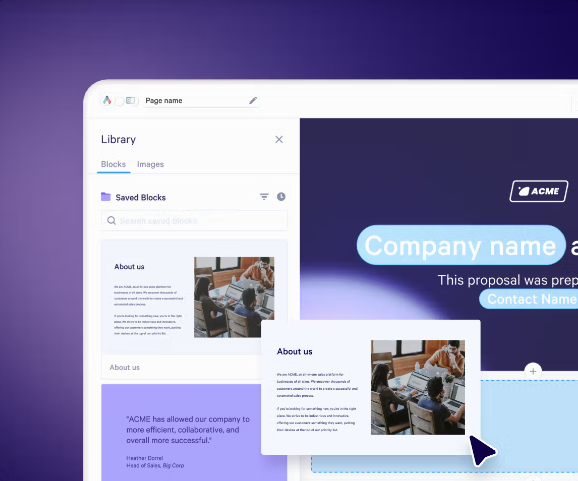
Qwilr helps accountants create interactive, web-based sales proposals and quotes. It features a drag-and-drop editor, customizable templates, e-signatures, payment collection, and real-time analytics. Qwilr integrates with QuickBooks and Xero to ease the proposal process and quicken deal closures.
Key Features
- Interactive Webpage Proposals: Turn static documents into responsive web pages that can include embedded videos and other dynamic content.
- Real-Time Analytics & Notifications: Get detailed insights on who viewed the proposal and receive instant alerts when a client engages.
- Dynamic Quote Block: Allow clients to adjust quantities and services in real time for enhanced engagement.
- Qwilrpay (e-Signatures & Payments): Collect legally compliant e-signatures and process payments directly within the proposal webpage.
- Live Editing & Updates: Make corrections or changes to the proposal instantly after sending the link without needing to resend a new document or version.
Pricing
Qwilr offers two pricing plans:
- Business: $35/user/month (annually billed); includes content editor, e-signatures, QwilrPay, and more.
- Enterprise: $59/user/month (annually billed, 10-user minimum); includes all Business features plus custom branding, team permissions, and more.
Pros
- Integrated e-signatures and instant payments for an accelerated closing process.
- Visually engaging proposals with dynamic, interactive features.
- Access to a wide range of stock media via Unsplash.
Cons
- Limited customization options, especially when exporting to PDF.
- Lacks auto-fill for client data, requiring manual input.
5. Better Proposals
Better Proposals equips businesses to create professional proposals in a fraction of the usual time. It comes with customizable templates, e-signatures, and payment integrations that simplify the proposal process for accountants, improving client engagement and increasing overall efficiency.

Key Features
- Interactive Web Proposals (Web Link Delivery): Send proposals via a simple, professional web link instead of a static PDF.
- Built-In Electronic Signatures: Include legally binding, digital signature capability directly in the proposal to let clients sign instantly.
- Proposal Analytics & Tracking: Get notified the moment a client opens the proposal and see exactly which sections they read, in what order, and for how long.
- Embedded Client Onboarding: Access a customized, step-by-step onboarding process that automatically starts the moment the client signs the proposal.
- Payment Gateway Integration: Embed secure payment portals into the proposal to allow clients to sign and pay in a single transaction.
Pricing
Better Proposals offers three pricing plans:
- Starter: $19/user/month (billed monthly); includes digital signatures, interactive pricing tables, payment integrations, content library, and analytics.
- Premium: $29/user/month (billed monthly); adds custom domain, CRM integrations, automatic expiry dates, Zapier integration, and proposal AI.
- Enterprise: $49/user/month (billed monthly); includes all Premium features plus content locking, simultaneous editing, inline commenting, manager approvals, and advanced user permissions.
Pros
- Over 250 customizable templates for various business needs.
- Mobile-responsive proposals for consistent client experience.
- Reusable content library for efficient proposal assembly.
Cons
- No option to export proposals to Word or editable formats.
- Limited offline capabilities for proposal access.
6. Ignition
Designed for accounting and tax professionals, Ignition automates proposals, contracts, billing, and payments in one place. Features like branded proposals, e-signatures, tiered pricing, and integrations with tools like QuickBooks help simplify workflows and boost cash flow.
Key Features
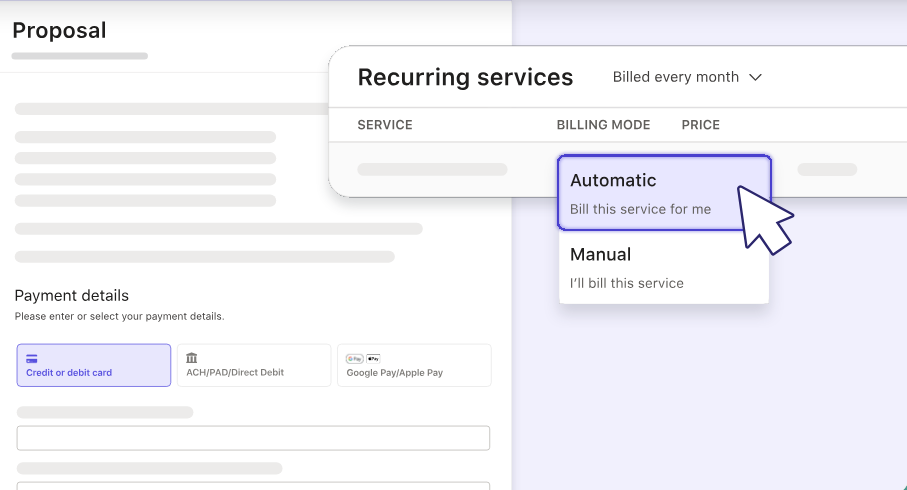
- Proposal-to-Payment Automation: Collect client payment details (credit card, ACH, etc.) upfront within the proposal.
- Automated Contract & Engagement Letters: Generate legally binding engagement letters alongside the proposal, all with a single e-signature.
- Automated Workflow Integration: Automatically create tasks, projects, and work orders in connected practice management or workflow tools.
- Recurring Billing Management: Easily set up, manage, and automatically bill for recurring services, eliminating accounts receivable.
- Proposal Renewals: Streamline the annual renewal process for existing clients, including the ability to apply bulk price increases.
Pricing
Ignition offers four pricing plans:
- Solo: $39/month (annually billed); includes 1 user, 20 active clients, branded proposals, and more.
- Core: $99/month (annually billed); includes everything in Solo, plus 3 users, 50 active clients, bulk proposal creation, and more.
- Pro: $229/month (annually billed); includes everything in Core, plus 15 users, 350 active clients, custom email branding, and more.
- Pro+: $399/month (annually billed); includes everything in Pro, unlimited users, 600 active clients, proposal reviews and approvals, and more.
- Enterprise: Custom pricing for larger organizations needing advanced scalability and flexibility.
Pros
- Supports client self-service payment updates for cash flow management.
- Bulk proposal creation saves time for firms with multiple clients.
- Service library for standardizing offerings across proposals.
Cons
- Payment processing times can be slow, affecting cash flow.
- Integration issues reported with some CRM and project management tools.
7. Cone
Cone is a proposal and practice management platform that handles the administrative grunt work accountants deal with daily.
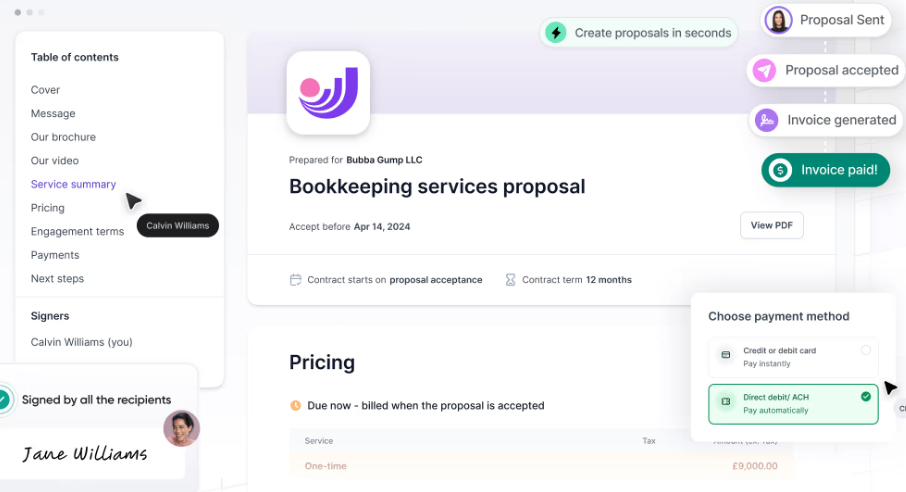
The tool automates proposals, engagement letters, billing, and payments. Customizable proposals, smart invoicing, and integrations with QuickBooks and Xero make workflows easier and more efficient.
Key Features
- Unified Client Engagement Flow: Manage proposals, contracts, billing, and automated payments all from one affordable, consolidated platform.
- Built-In Sales Pipeline: Utilize a simple CRM-like sales pipeline to track all your leads, monitor proposal status, and prioritize follow-ups.
- Auto-Charging & Invoicing: Automatically generate invoices and charge clients for recurring services based on payment information saved at acceptance.
- Client Portal & Secure Requests: Provide a secure, branded portal for clients to complete assigned tasks, upload files, and communicate with your team.
- Pricing Packages & Quotes: Offer multiple pricing packages (e.g., Bronze, Silver, Gold) and generate detailed quotes to accelerate deals.
Pricing
Cone offers two pricing plans:
- Essentials: $12/user/month (billed monthly) or $9/user/month (billed annually); includes unlimited clients and proposals, a flexible proposal editor, and more.
- Growth: $18/user/month (billed monthly) or $12/user/month (billed annually); includes all Essentials features plus media embedding and more.
Pros
- Pre-built, customizable proposal templates for quick deployment.
- Supports multiple payment methods, including ACH and credit/debit cards
- Includes a client portal for document sharing and e-signatures.
Cons
- No autosave, risking loss of work on page reloads.
- Lack of helpful guides for initial usage.
Close Deals Faster with Proposify
All seven software reviewed here are designed to help you create better proposals, but the best choice for your firm depends on your specific needs. If you’re looking for deep accounting integrations, granular tracking, and a platform that helps you close deals faster, Proposify delivers the complete package.
You can build, send, track, and close proposals without jumping between systems. Reusable content keeps every proposal on-brand and consistent, while real-time analytics show you exactly when clients engage and what matters most to them.
Ready to see how Proposify works for accounting firms? Book a demo today.